Subscription properties
A subscription's properties are the Subscription Wizard's settings, one tab per step. Settings you can't change after the subscription is created are noted.
Saving changes
- Every save restarts from scratch. Saving clears the checkpoint, so an interrupted baseline doesn't resume.
- Saving can re-create the destination table. With Create every time subscription is Saved (snapshot: Create object when subscription is saved), the save drops and creates the destination table, and its data is lost.
- Incremental subscriptions: a save may need a new baseline. You choose; see Saving an incremental subscription.
Source
Which source object is replicated. For an existing subscription, the replication type can't be changed; for an incremental one, neither can the source object.
| Option | What it does | Default |
|---|---|---|
| Replication Type | See Snapshot or incremental. | Incremental if the source has a Capture Agent schema, otherwise Snapshot |
| Copy DDL only (view, alias, synonym) | Creates views, aliases and synonyms at the destination as the same kind of object, instead of copying their data into a table. You write the CREATE statement on the Creation tab. |
off |
| Database, Object Schema, Object Name | % matches any characters. |
the source's default schema, % |
| Object Type | New subscriptions: Refresh lists only source objects of the chosen types (TABLE, VIEW, ALIAS, SYNONYM). A type the source doesn't have lists nothing. An incremental subscription lists tables only. |
All types |
| Allow Mixed-Case Input | When off, what you type is converted to uppercase. | depends on the source database |
| Select a Member to Replicate | Db2 for i sources with multi-member access: which member of the file to replicate. *ALL creates one subscription per member; *FIRST uses the first member. |
*FIRST |
Import... and Export... (new subscriptions only) read or write a list of tables, one per line, as
schema<tab>table<tab>TABLE. Import... also accepts semicolons (schema;table;TABLE) and an optional fourth field,
the destination table name, used when you create several subscriptions (see the Summary step). Use them to create
the same subscriptions on another server, or to retry the tables that failed. Lines starting with - are comments,
only lines of type TABLE are read, and names are converted to uppercase unless Allow Mixed-Case Input is on.
Tables that don't exist are listed as NONEXISTENT and can't be selected.
Destination
For an incremental subscription, the destination can't be changed after the subscription is created.
Destination and object
A destination the Replicator Service can't connect to has a red icon in Destinations.
| Option | Default |
|---|---|
| Database | the destination's default Database (see Defaults) |
| Object Schema | the destination's default Object Schema (the group's defaults for group members) |
| Object Name | the source name, converted to what the destination accepts |
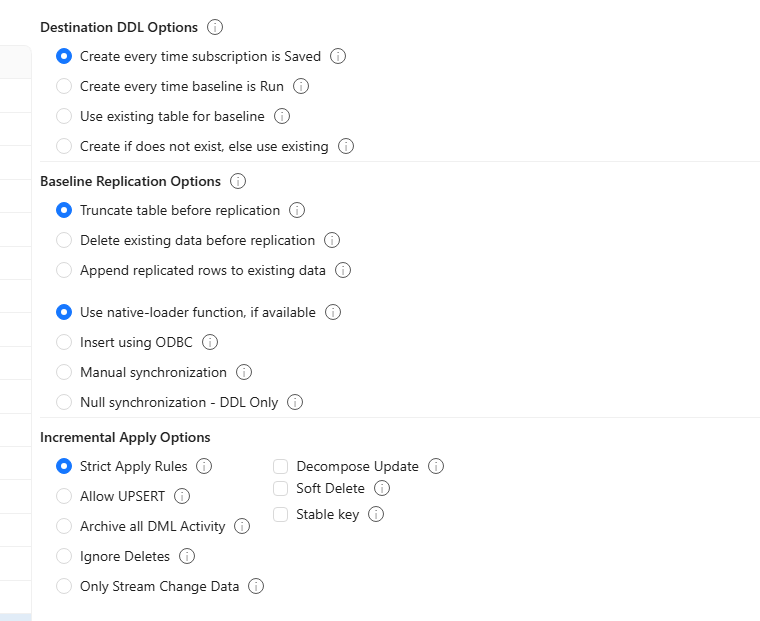
Destination DDL Options
| Option (snapshot / incremental label) | What it does | When to use it |
|---|---|---|
| Create object when subscription is saved / Create every time subscription is Saved (default) | Drops and creates the destination table when you save the subscription. Runs keep the table and empty it as set in Baseline Replication Options. | Most subscriptions: the table always matches the subscription's columns. |
| Re-create object on each replication / Create every time baseline is Run | Drops and creates the table at the start of every run or baseline. | The table's definition may change outside SQDR, or you want a fresh table each time. |
| Use existing table / Use existing table for baseline | Never creates or drops the table. It must exist; when you save, the columns are matched to it by name, and mapped columns it doesn't have are removed from the subscription. The subscription also takes the column types from the table (see Who owns the destination table). | Tables you manage yourself, for example with extra columns, partitions or storage options. For incremental subscriptions, the Incremental Apply Options aren't available with this option. |
| Create if does not exist, else use existing | Creates the table when you save if it doesn't exist; otherwise uses it as an existing table. | Scripts and repeated deployments where the table may or may not exist. |
The option also decides what the Replicator Service may change in the table when you save: see Who owns the destination table.
Baseline Replication Options
| Option | What it does |
|---|---|
| Truncate table before replication (default) | Empties the table with TRUNCATE, the fastest way. Not available when the table is re-created on each run, or for destinations that can't truncate. |
| Delete existing data before replication | Empties the table with DELETE, in batches of the ODBC commit interval. Use it when TRUNCATE isn't allowed (for example, because of permissions or foreign keys), or when several subscriptions share one table: with a partition key or Soft Delete, only this subscription's rows are deleted. |
| Append replicated rows to existing data | For example, to accumulate one run per day. |
Truncate table before replication isn't offered, but the destination supports TRUNCATE? Keep Delete existing
data before replication and add a TRUNCATE TABLE statement for the destination table to the destination's
before-processing on the Processing tab. The table is then empty when the DELETE runs, so the DELETE
is quick.
| Loader | What it does |
|---|---|
| Use native-loader function, if available (default) | Uses the destination's bulk loader when there is one (for example, Bulk Copy for SQL Server), otherwise ODBC inserts. The fastest option. |
| Insert using ODBC | Commits every ODBC commit interval rows. For example, to troubleshoot the native loader. |
| Manual synchronization | Doesn't copy data. A run only prepares the destination (drops, creates or empties the table, runs the before processing) and stops as Suspended. You load the table yourself, by any means, and run the subscription again to complete it. For very large tables that are faster to load with your own tools. |
| Null synchronization - DDL Only | Doesn't copy data: prepares the destination, runs the processing SQL, and completes. |
| Automatic | Replaces the first two options for destinations that use an Apply extension (such as Databricks): the destination chooses the loader. |
Incremental Apply Options
See Incremental apply options. The group's Subscription Wizard Defaults set the defaults for new members.
Stable key (for a snapshot subscription, under Destination DDL Options) says that the subscription's key values never change at the source. Tick it only if your application guarantees that. See Stable key.
Subscription Options
Import Mapping Script... applies a script of column operations to the subscriptions being created: add derived columns, drop source columns, or map a source column to another destination name. Useful for applying the same changes to many subscriptions. See Mapping scripts and Derived columns.
Mapping Options
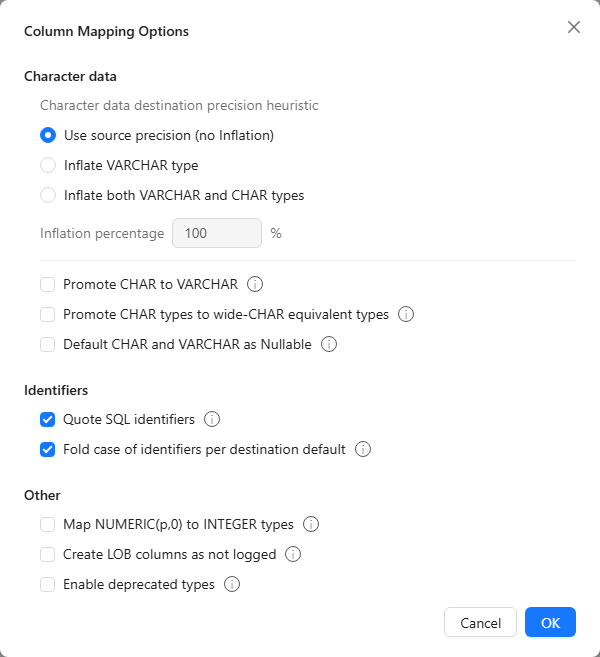
The Replicator Service's Subscription Wizard settings, for this subscription only; what each option does is described there, and the service's values are the defaults here. They apply when the columns are built, in the wizard or with Rebuild Column List on the Columns tab. How types are mapped: Data type mapping.
- Inflation percentage is ignored here: the Replicator Service maps the columns with its own (service-wide) value. To make columns longer, change the service's Inflation percentage.
- Promote CHAR to VARCHAR applies to columns longer than 1.
- Promote CHAR types to wide-CHAR equivalent types applies to SQL Server and Oracle destinations.
Group
- Snapshot: optional, and only when creating the subscription. A snapshot subscription can belong to several snapshot groups; manage that from the groups (see Snapshot groups).
- Incremental: required. Only incremental groups with the same source and destination are listed, and a group holds only one subscription per source table. To move the subscription to another group later, use Move Subscription (see Move).
Columns
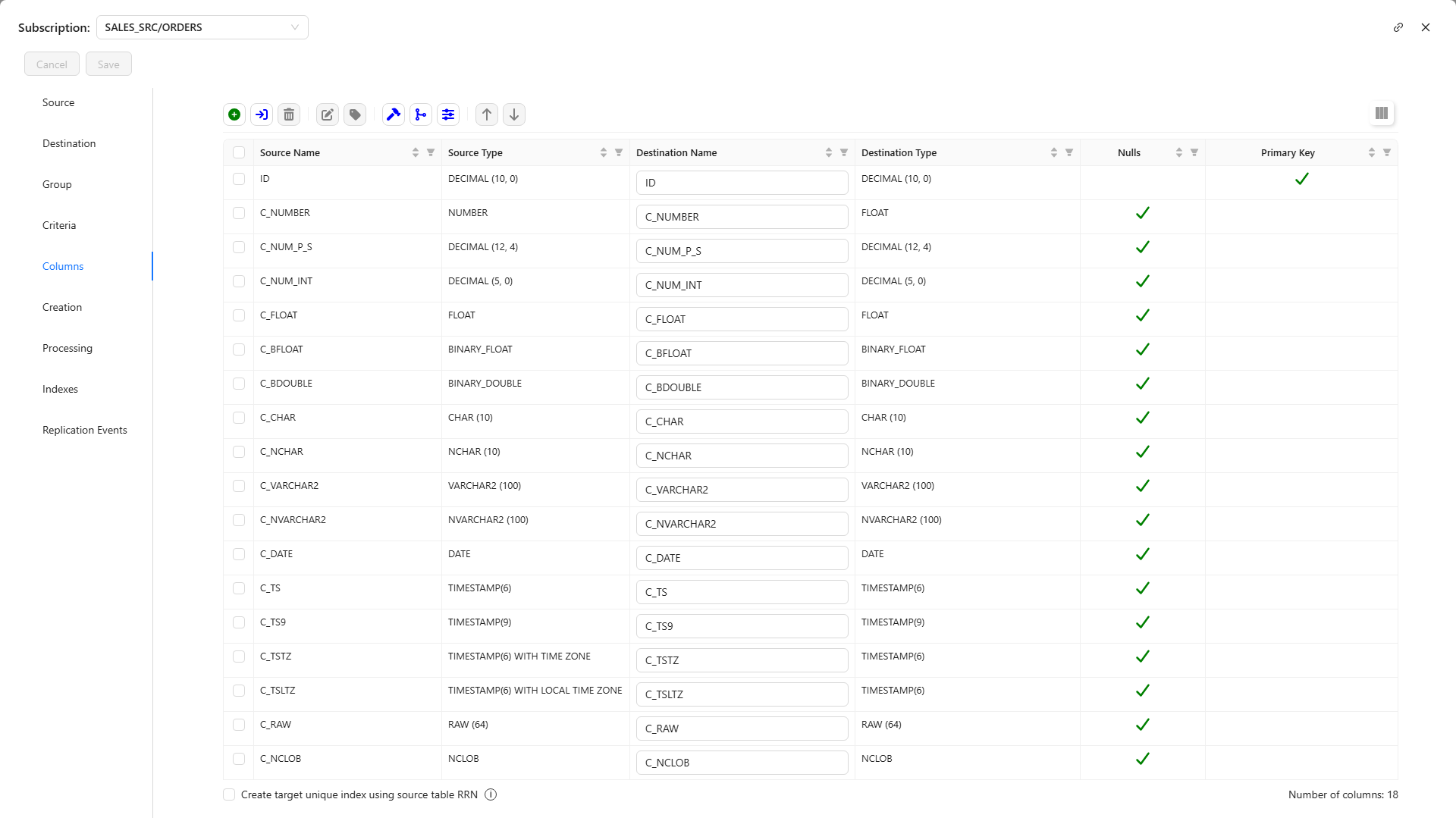
| Button | What it does |
|---|---|
| Modify Columns | With one column selected, you can also replace its value with an expression: see Derived phrases. |
| Rebuild Column List | Rebuilds the list from the source table with the current Mapping Options. In the Subscription Wizard, it re-applies the mapping script loaded with Import Mapping Script..., the columns entered with Enter Derived Column(s)... and, for a subscription that creates a new incremental group, that group's default derived columns. Changes made on this tab are lost: columns added, deleted, modified, renamed or moved, and derived columns inserted here. |
| Merge With Source | Existing subscriptions: compares the columns with the source table as it is now. Use it after the source table changed. |
Force hidden column adds the source's row identifier (the relative record number on Db2 for i, the ROWID on
Oracle) as a destination column: a derived column with the expression @RRN. It's available when the source has a row
identifier and, for an incremental subscription, the Capture Agent stages it. Apply then finds the rows it changes by
that column, which is indexed at the destination; the column's Row identifier use (Index or Primary key)
decides whether it also becomes the destination primary key. Clearing the box removes the column. For a group member,
the group's Force hidden column sets the default. Incremental subscriptions use the row identifier automatically
as the key for Db2 for i and Oracle tables without a primary key or unique index. See
The RRN or ROWID column.
Column changes to an incremental subscription can be applied by the group's next run instead of a baseline: see Saving an incremental subscription.
Criteria
A SQL condition, in the source database's SQL, that limits which source rows are replicated, for example
WHERE REGION = 'WEST'. WHERE is added if you leave it out.
The criteria must be empty or a WHERE condition. GROUP BY, HAVING and ORDER BY are refused, because the
Replicator Service orders the baseline by the key itself and adds its own conditions (to resume an interrupted copy, or
to copy a slice). They're allowed inside parentheses, for example in a sub-select
(ID IN (SELECT ... GROUP BY ... HAVING ...)) or in OVER (... ORDER BY ...). To replicate grouped rows, subscribe to
a source view that does the grouping. A subscription saved before 7.0 with such a criteria keeps running (a warning is
logged when the service starts) but can't be saved until you change its criteria.
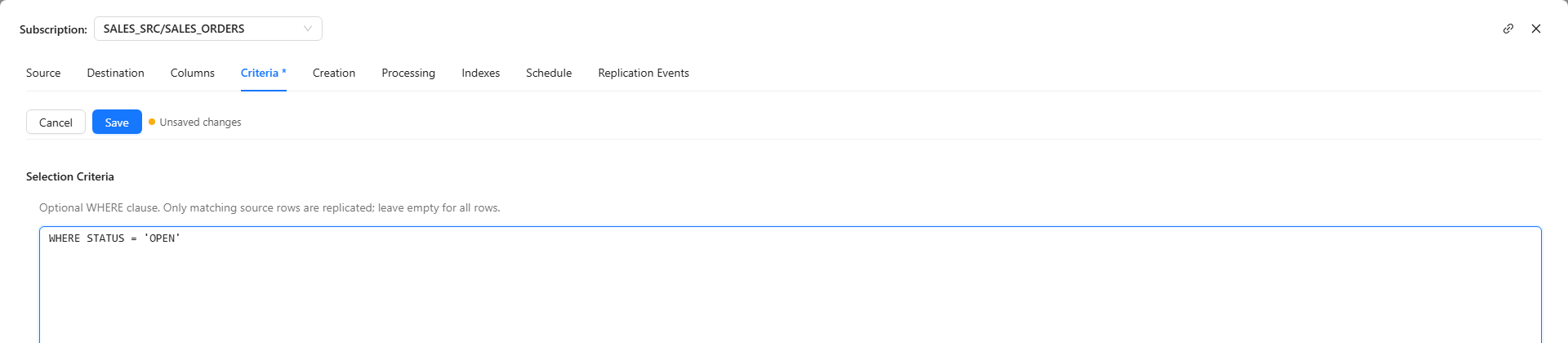
For an incremental subscription, the criteria also applies to captured changes: the Capture Agent passes on only changes to matching rows.
Criteria isn't available when you create several subscriptions at once, or for views, aliases and synonyms.
The tab also has Parallel baseline (advanced): copy the baseline of a very large table in slices, pieces of the source copy that run in parallel up to Max concurrent slices. See Parallel baselines with slices.
Creation
The CREATE statement for the destination table, built from the columns. For a table it's read-only; you can copy it,
for example to create the table yourself for Use existing table. For views, aliases and synonyms copied with
Copy DDL only, write the statement here.
Processing
SQL statements run on the source and the destination before and after each run (for an incremental subscription, each baseline), in the SQL of the database they run on.
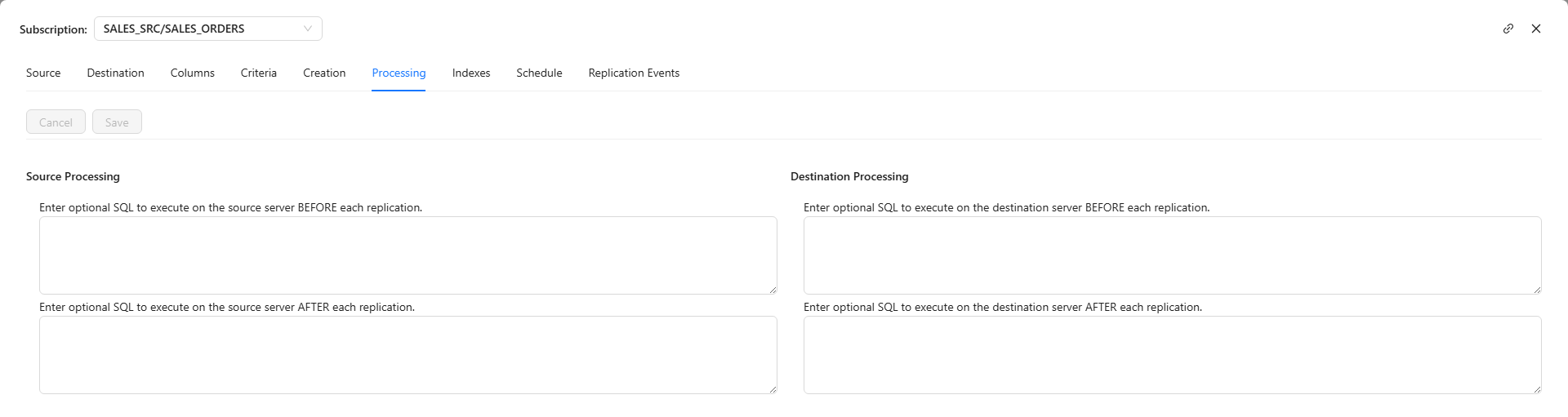
For example, to:
- lock or flag the source table while it's copied, and release it afterwards;
- drop destination triggers or constraints before the copy and re-create them afterwards;
- refresh statistics or dependent tables at the destination after the copy.
The destination's before-processing is committed before the copy starts. If an interrupted run resumes from a checkpoint, the before-processing doesn't run again.
Indexes
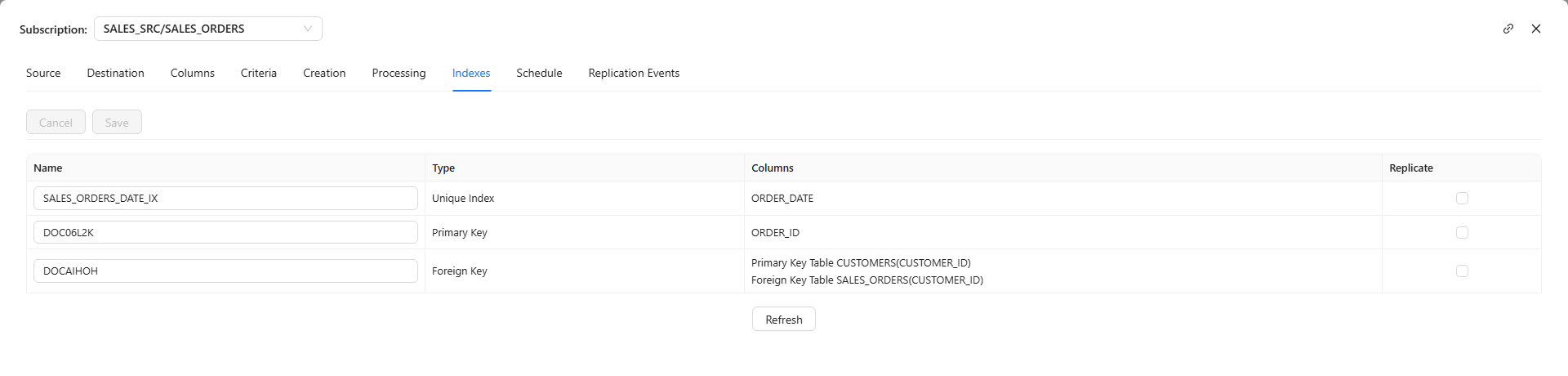
- A subscription run on its own creates only the ticked indexes. In a group run, the group's Replicate indexes, Replicate Primary Keys and Replicate Foreign Keys settings apply to all members.
- Indexes are dropped before the copy and created afterwards, which makes the copy faster.
- Unavailable rows: unique indexes of incremental subscriptions (the apply options manage the destination's unique keys), all indexes with Manual synchronization, and non-unique indexes for destinations without indexes (such as BigQuery, Snowflake, Databricks, Fabric and Kafka).
Schedule
Snapshot subscriptions only; incremental subscriptions are baselined by their group's schedule. See Scheduling.
Replication Events
The subscription's run history. Delete Statistics deletes it. See Replication events.
Saving an incremental subscription
When you save an incremental subscription, the Replicator Service first checks whether the changes need a new baseline. If not, the subscription is saved and keeps applying changes. If so, nothing is saved yet, and the Baseline Snapshot Required dialog lists the reasons, for example:
- the column list, the criteria or the RRN column changed;
- the table is re-created on every save (Create every time subscription is Saved), so every save needs a baseline;
- capture or apply options changed (for example Ignore Deletes, Archive all DML Activity or Decompose Update);
- the source table was altered or dropped.
Then choose:
| Choice | What happens |
|---|---|
| Alter Destination on Next Run | Offered for column changes (columns added, dropped, renamed or derived again) when the table isn't re-created on save. No baseline: the changes are saved as a plan, and the group's next run (manual, scheduled or automatic) alters the destination table. When they can't be applied this way (for example, for a Fabric or S3 Tables destination), the dialog says why. For each added or re-derived column, choose Recompute existing rows (the run fills in the existing rows; the group's change data waits meanwhile) or New changes only (existing rows keep no value; not for a NOT NULL column). For a removed column, tick Also drop ... from the destination table to drop it there too (its data is lost). |
| Resume Without Baseline | Offered when the table is kept (Use existing table for baseline, or Create if does not exist, else use existing with the table there) and the source table wasn't altered. The changes are saved and incremental replication continues right away. The table isn't refreshed: making its existing data match the new definition is up to you. |
| Require Baseline | The changes are saved and the subscription needs a new baseline; its changes aren't applied until the baseline runs. |
While a plan is pending, the properties show Pending alter - run to apply with the planned changes, and the Columns tab shows the planned columns. Discard drops the plan: the subscription keeps its current columns. Saving other column changes replaces the plan; to resume or require a baseline instead, discard the plan first.
Who owns the destination table
The Destination DDL Option also decides who owns the destination table, and so what the Replicator Service may change in it:
- Use existing table / Use existing table for baseline: the table is yours. The Replicator Service never creates, drops or alters it; a save matches the subscription's columns to the table's. If you add a column to an incremental subscription, Resume Without Baseline and Require Baseline are refused while the table lacks it: add it to the table yourself, or choose Alter Destination on Next Run (see Saving an incremental subscription).
- Create if does not exist, else use existing: the table is the Replicator Service's. A save creates it when it's missing, and when you add a column to an incremental subscription and choose Resume Without Baseline or Require Baseline, the save adds the column to the table (as nullable, since the table may already have rows).
- Create object when subscription is saved / Create every time subscription is Saved and Re-create object on each replication / Create every time baseline is Run: the table is the Replicator Service's, re-created as described in Destination DDL Options.
The table decides its column types. Whatever the option, the subscription keeps the column types the destination
database reports, not the types the mapping asked for: a database can store a type under another name or size (for
example an INTEGER as NUMBER(10) on Oracle). Apply binds the values with those types, and
ALTER processing compares the source's changes with them.
- Existing table: when you save, the subscription takes the table's types. Where they differ from the subscription's in a way that matters, the save reports the column with both types (for example "Specified: char(8); the destination table has int.") and, with validation, saves nothing. A difference matters when the table holds another kind of data (character, numeric, date and time, or binary), a date or time type can't hold what was specified, or the column has less room (characters, integer digits or scale). Another name for the same data, a wider column, or a different nullability isn't reported. If you save anyway, the table's types are kept.
- Table the Replicator Service creates: after the
CREATE, the subscription takes the types the database created. With Create every time baseline is Run, a run whose table came out different logs a warning once ("Destination table ... does not have these columns as the subscription specifies them"), and the nextCREATEasks for those types.