Derived columns
A derived column is a destination column computed from a SQL expression instead of copied from a source column.
Use one to add a constant (such as the source system's name), compute a value from other columns (PRICE * TAXRATE),
convert a type or format, concatenate text, or record capture metadata, such as when and how each row last changed.
Any subscription that replicates a table can have derived columns. You can also replace a source column's value with an expression; see Derived phrases.
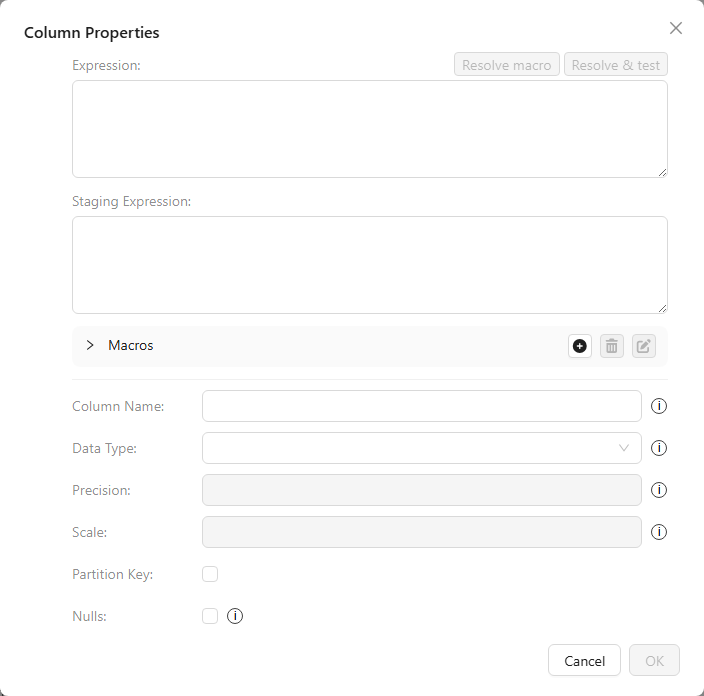
Add a derived column
- On the subscription's Columns tab (or the wizard's Columns step), click Insert Derived Column; or, on the Destination step, click Enter Derived Column(s)....
- For the same derived columns on every new member of an incremental group, use the group's Default Derived Columns (see Default derived columns for a group).
| Field | What it's for |
|---|---|
| Expression | The SQL expression, in the source database's SQL. |
| Staging Expression | Incremental subscriptions: the same expression in Db2 for LUW SQL, when it differs. See Expressions for incremental subscriptions. |
| Partition Key | Makes the column a partition key: see Several subscriptions in one table. Only character types, not nullable. |
| Nulls | Tick it for capture metadata, whose value is NULL until the row changes. |
| Resolve macro | Shows the expression with its SQDR macros replaced, as it will be sent to the source. |
| Resolve & test | Also checks the resolved expression against the source table and shows the type it returns: use it to choose the destination type. |
Rules for expressions
- An expression is a constant, a function, or any combination of source column names, constants and functions connected by operators, in valid SQL for the source database (syntax can differ slightly by source and version).
- A derived column returns one value per source row. An aggregate function (such as
SUM,AVG,MAXorMIN) returns one value per group of rows, so it can't be combined with ordinary columns in one subscription (see examples 3 and 4). - If an arithmetic expression uses a NULL column, the result is usually NULL.
Expressions for incremental subscriptions
For an incremental subscription, the expression is used twice: in the source database for the baseline, and in the Capture Agent's Db2 for LUW staging database for changes. So it must also be valid Db2 for LUW SQL. If it isn't (for example, an Oracle-specific function), enter the Db2 for LUW equivalent in Staging Expression; this avoids creating User Defined Functions in the staging database.
The two expressions must return the same values, or baselined rows and rows changed later differ at the destination. When you write the staging expression:
- Use Db2 for LUW functions. Other databases' functions, such as SQL Server's
CONVERTorDATEADD, or functions that exist only on the source, fail in the staging database. So does a criteria (Criteria tab) that isn't valid Db2 for LUW SQL. - Watch the case of names. Db2 folds unquoted names to upper case, and a quoted name must match exactly. If a change fails with SQL0206 (column not found) for a lower-case or mixed-case column name, write the name as the staging table has it: in upper case, or in double quotes with its exact case.
- Give explicit formats. Converting a date or timestamp to text gives Db2's format in the staging database (for
example
2026-04-21-10.15.30.000000, with a hyphen between date and time), whatever the source gives. UseVARCHAR_FORMAT(<column>, 'YYYY-MM-DD HH24:MI:SS')or another explicit format that matches the source expression. - Guard conversions. Casting non-numeric text to a numeric type fails in Db2 and stops the apply (for example
SQLSTATE 22018, native error -420, for
DECFLOAT). Convert only values you've checked, for example withCASE WHEN ... THEN CAST(...) ELSE NULL END. - Test both. Resolve & test checks against the source only. Run a baseline, change a row at the source, and compare the two rows at the destination.
Examples
The first examples use a sales table with the columns ITEM, PRICE, TAXRATE and SALESPERSON. Some include the
equivalent mapping script.
1. A constant
Add a column EVENT with the same value in every row.
| Expression | Column Name | Data Type | Precision |
|---|---|---|---|
'Spring Sale' |
EVENT |
char | 15 |
{ "action": "column", "schema": "%", "table": "%", "dest_column": "EVENT", "source_expression": "'Spring Sale'",
  "stage_expression": "", "dest_type": "char", "precision": 15, "scale": 0, "nullable": false }
2. Arithmetic on each row
Add a column SalesTax with PRICE multiplied by TAXRATE. If either is NULL, SalesTax is NULL for that row.
| Expression | Column Name | Data Type | Precision | Scale |
|---|---|---|---|---|
PRICE * TAXRATE |
SalesTax |
decimal | 8 | 2 |
3. A total of the whole table
Create a table with the sum of all prices. The sum returns one row, so delete all the source columns and keep only the derived column.
| Expression | Column Name | Data Type | Precision | Scale |
|---|---|---|---|---|
SUM(PRICE) |
TOTAL |
decimal | 8 | 2 |
{ "action": "drop", "schema": "%", "table": "%", "source_column": "ITEM" }
{ "action": "drop", "schema": "%", "table": "%", "source_column": "PRICE" }
{ "action": "drop", "schema": "%", "table": "%", "source_column": "TAXRATE" }
{ "action": "drop", "schema": "%", "table": "%", "source_column": "SALESPERSON" }
{ "action": "column", "schema": "%", "table": "%", "dest_column": "TOTAL", "source_expression": "SUM(PRICE)",
  "stage_expression": "", "dest_type": "decimal", "precision": 8, "scale": 2, "nullable": false }
4. Subtotals by group of rows
Create a table with the total price per salesperson. A criteria can't contain GROUP BY (see
Criteria), so do the grouping in a view at the source and replicate the view
with a snapshot subscription:
CREATE VIEW SALES_BY_PERSON AS
  SELECT SALESPERSON, SUM(PRICE) AS TOTAL FROM SALES WHERE PRICE > 0 GROUP BY SALESPERSON
5. Concatenating text
With a personnel table, add a column with LASTNAME, FIRSTNAME.
| Source | Expression | Column Name | Data Type | Precision |
|---|---|---|---|---|
| SQL Server | LASTNAME + ', ' + FIRSTNAME |
FULLNAME |
char | 35 |
| Db2 for i, Oracle | LASTNAME \|\| ', ' \|\| FIRSTNAME |
FULLNAME |
char | 35 |
6. Converting data types
Db2 for i dates stored as numbers. Stelo provides User Defined Functions (UDFs) for Db2 for i dates in
DECIMAL(8,0) (numeric, zoned or packed) columns. They return a DATE; NULL returns NULL, and 0 returns
1901-01-01. For incremental replication, the UDF must exist in both the source and the staging database; if it's
missing, contact Stelo Support.
| Function | Source column holds |
|---|---|
MDY(col) |
MMDDCCYY in a DECIMAL(8,0) column |
YMD(col) |
CCYYMMDD in a DECIMAL(8,0) column |
CYMD(cc, yy, mm, dd) |
century, year, month and day in four DECIMAL(2,0) columns |
For example, MDY(MDYZ), column name MDYZ_1, data type date, nullable.
Db2 character dates to SQL Server datetime. For a Db2 CHAR(8) column holding YYYYMMDD, use
TIMESTAMP(<column> || '000000') with data type datetime. To replicate it back to Db2 as CHAR(8), use SQL
Server's CONVERT(char(8), <column>, 112); the last argument is the SQL Server date style (112 is yyyymmdd).
Oracle DATE to Db2 DATE. Delete the date column from the subscription and add a derived column with the same
name: TO_CHAR(<column>, 'YYYY-MM-DD'), data type DATE. Change the format if your Db2 system uses another one.
Capture metadata
These built-in macros put the Capture Agent's capture metadata into a derived column. Each must be the entire
expression, starting with @ (@TS, not @TS || 'x'), and they're case-sensitive: @TS and @ts differ.
Most values exist only for changes and are NULL during a baseline: make these columns nullable. The data types are guidelines and depend on the destination.
| Macro | Value | Type |
|---|---|---|
@TX |
The transaction identifier generated by Stelo Capture for the change (not the source's transaction ID). | BINARY(10) |
@TS |
When the change was made at the source; NULL if the row hasn't changed since the baseline. | TIMESTAMP (SQL Server: DATETIME2) |
@ts |
When the row was baselined or last changed. | TIMESTAMP |
@LT |
Load time: when the baseline ran. Not updated by changes. | TIMESTAMP |
@lt |
When the row was first inserted at the destination, by a baseline or by a change. Not updated afterwards. | TIMESTAMP |
@tz |
The source system's time zone offset (HHMMSS). |
DECIMAL(6,0) |
@TYPE |
The operation: see Operation codes. | CHAR(1) |
@SEQ |
The order of the change within its transaction, and the order in which it was read from the source log. | BIGINT |
@RRN |
The source's row identifier: the relative record number (Db2 for i) or ROWID (Oracle); for snapshot subscriptions, also Db2 for LUW (RID), Informix (ROWID) and PostgreSQL (ctid). See The RRN or ROWID column. |
BIGINT (Db2 for i), CHAR(18) (Oracle) |
@JED, @JED('element') |
Journal entry details, Db2 for i only. See Journal entry details. | VARCHAR(254) |
@SCHEMA |
The source schema. | VARCHAR(128), nullable |
@OBJECT |
The source table. | VARCHAR(128), nullable |
@MBR |
The Db2 for i member name; usually NULL or the table name. | CHAR(20) |
@DSN |
The name of the subscription's source. | VARCHAR(128), nullable |
@null |
NULL. Can be used for the expression, the staging expression or both. | any |
@skip |
Creates the column at the destination but never writes to it: its value starts as NULL and changes only if you change it. Use it for columns you maintain yourself. Set both the expression and the staging expression to @skip. |
any |
A space before @ turns off the substitution: the text is used as an ordinary expression.
Operation codes
@TYPE |
Meaning |
|---|---|
I, U, D |
An insert, update or delete at the source. |
K |
An update changed the row's key. The K row carries the old key values and is followed by the U row with the new ones, so that the row with the old key is removed at the destination. |
B |
The before image of an update: the column values before the change. Sent for subscriptions with a criteria, or that archive, stream or soft-delete changes. Not available from some sources (such as Db2 for i tables journaled with *AFTER images only, or SQL Server). |
S |
The subscription needs a new baseline, for example after a source reorganization or a break in the Capture Agent's log reading. |
X |
The source table was dropped. |
A |
The source table was altered. |
C |
All the changes collected during a baseline have been processed. It can refer to baselines of other groups, or other agents, that subscribe to the same table. |
Journal entry details (Db2 for i)
@JED returns the journal entry details as XML; @JED('element') returns one element. First turn on
collectLogDetail on the Capture Agent's Configuration tab (saving restarts the agent). Only changes captured
after that have details; baselined rows and earlier changes have NULL. The elements are in the table below; for the
journal entry's time, use @TS. Make the column nullable and large enough for the element, for example
@JED('journal') as VARCHAR(20). @JED('rrn') and @JED('seqno') can be mapped to BIGINT. After a baseline,
@JED('enttyp') is RR.
| IBM CDC column | Macro | Type | Length |
|---|---|---|---|
| Commit Cycle ID (&CCID) | @JED('ccid') |
VARCHAR | 20 |
| Entry Type (&ENTTYP) | @JED('enttyp') |
CHAR | 2 |
| Entry Type Code (&CODE) | @JED('code') |
VARCHAR | 2 |
| Journal Name (&JOURNAL) | @JED('journal') |
VARCHAR | 20 |
| Journal Sequence Number (&SEQNO) | @JED('seqno') |
VARCHAR | 20 |
| Record Modification User (&USER) | @JED('user') |
VARCHAR | 10 |
| Source Job Name (&JOB) | @JED('job') |
VARCHAR | 10 |
| Source Job Number (&JOBNO) | @JED('jobno') |
VARCHAR | 6 |
| Source Job User (&JOBUSR) | @JED('jobuser') |
VARCHAR | 10 |
| Source Program Name (&PROGRAM) | @JED('program') |
VARCHAR | 10 |
| Source RRN (&CNTRRN) | @JED('rrn') |
VARCHAR | 20 |
The defaults for @RRN columns (name, type and precision) are Replicator Service settings.
When a row was applied, and replication lag
No macro records when a change was applied. Use a derived column with the current time in both expressions:
| Field | Value |
|---|---|
| Expression | The source database's current time, for example CURRENT_TIMESTAMP. Used for rows copied by a baseline. |
| Staging Expression | CURRENT TIMESTAMP, or CURRENT TIMESTAMP - CURRENT TIMEZONE for UTC. Used for changes. |
| Data Type | A timestamp type, nullable. |
For changes, the value is the Stelo VM's time when the Replicator Service read the change from the staging
database, shortly before applying it. CURRENT TIMESTAMP - CURRENT TIMEZONE converts it from the server's time zone
to UTC. Capture macros such as @TS and @lt can't be converted this way, because a macro must be the whole
expression.
To measure each row's replication lag, add a second column with @ts (when the row was last changed at the source,
or baselined) and compare the two. Both times must be in the same time zone: if the source system and the Stelo Capture
server are in different zones, allow for the difference (@tz gives the source's offset).
SQDR macros
An expression can also start with one of your own SQDR macros: named, reusable SQL defined once for the
Replicator Service, such as @TODATE(ORDER_DT). Use them when many subscriptions need the same expression, or the SQL
differs by source database. See SQDR macros.
Replace a column's value: derived phrases
A derived phrase replaces a source column's value with an expression; the column stays the same source column in
the subscription. Use it to change what is replicated without adding a column: for example, to replicate COMPNAME in
upper case, or to shift a key column's values so that rows from two source systems don't collide in one destination
table.
Unlike a derived column, which is an extra destination column, a derived phrase changes an existing one. On a key column, the derived value is also the key apply uses to find the rows it updates and deletes.
Add derived phrases to a column
- On the subscription's Columns tab (or the wizard's Columns step), select the column and click Modify Columns.
- Under Derived phrases, tick Replace the column value with derived phrases.
- Enter the Source expression: the expression the baseline uses, in the source database's SQL, written with the
column's own name (for example
UPPER(COMPNAME)). Resolve macro and Resolve & test check it as for a derived column, and you can start it with an SQDR macro. - Incremental subscriptions: enter the Staging expression if the source expression isn't valid Db2 for LUW SQL. Apply uses it for changes, in the staging database (see Expressions for incremental subscriptions). Without it, apply uses the source expression.
- Check the destination type: it must hold the derived value. Save the subscription. When the source expression gives another type than the column's and the destination column can't hold every value (a value longer than a fixed-size character or binary column, or text into a number column), the save warns; the destination type stays as you set it.
For an incremental subscription, adding or changing phrases is a column change: see Saving an incremental subscription.
Rules
- Same value both ways. The source expression (baseline) and the staging expression (changes) must give the same value, or baselined rows and rows changed later differ at the destination.
- Only the column itself. In an incremental subscription, the phrase apply uses may name only its own column: apply sets a column only when it changed, and a change's other columns aren't always staged, so a value computed from another column would go wrong. Otherwise the subscription isn't saved.
- Key columns. The derived value becomes the destination key: both expressions must give the same unique value and name only the key column itself. A phrase that can give values longer than the destination column is refused, because a key cut to fit could match another row's key.
- Subscriptions keyed by the row identifier (
@RRN): the key columns are ordinary columns, so their phrases are value phrases. - Not available for destinations that use a Java connector (Snowflake, Databricks, Google BigQuery, Microsoft
Fabric, Kafka and S3 Tables), on
sql_variantcolumns (see Data type mapping), and on key columns of an incremental subscription that has LOB columns. - LOB columns. A phrase on a LOB column replaces its value too: in the baseline, and when apply reads the column's value from the source table.
- Source table changes. When the source column is altered, a column with phrases keeps its destination type: it holds the phrase's result, not the source type.
Example
An incremental subscription of an Oracle COMPANY table replicates company names in upper case and shifts the company
numbers (the key column COMPID) so that they don't collide with another system's rows in the same destination table
(see Several subscriptions in one table):
| Column | Source expression | Staging expression |
|---|---|---|
COMPNAME |
UPPER(COMPNAME) |
(empty: apply uses the source expression, which is also valid Db2 for LUW SQL) |
COMPID (key) |
COMPID + 1000000 |
(empty) |
The baseline copies the upper-case names and shifted numbers, and updates and deletes find their rows by the shifted key.
Several subscriptions in one table
Several subscriptions (for example, the same table from several source databases) can write to one destination table
if each has a partition key: a derived column, with Partition Key ticked, whose value identifies the
subscription's rows. Its expression must be a character constant (such as 'EAST'), @DSN or @SCHEMA, and its type
a non-nullable character type.
Each subscription is then limited to its own rows: a baseline deletes and counts only the rows with its partition key value, and changes are applied only to those rows. Use Delete existing data before replication so that one subscription's baseline doesn't empty the others' rows.
The partition key is added to the table's key: the Replicator Service creates the destination primary key (and the index it uses to find rows) over the partition key column and the source's key columns together, so that the same key value can exist once per subscription. Choose the expression by where the tables are:
| The tables are | Partition key expression |
|---|---|
| In several schemas of one source database (for example one schema per store or branch) | @SCHEMA: the source table's schema. |
| In several source databases, even of different types | @DSN: the source's name. |
| Anywhere, with a value you choose | A character constant, such as 'EAST'. |
A subscription can have more than one partition key column.
Example: one table from several schemas
The schemas STORE1 and STORE2 of one source database each have a table INVENTORY, with the key PRODUCTID.
The rows differ per store: not every product is stocked everywhere, and descriptions and quantities vary. To collect
both into one destination table INVENTORY, with a column SCHEMAID that says which store each row comes from:
- Create an incremental group for the source and the destination (one group is enough for several schemas of one source; see Create an incremental group).
- Add a member for
STORE1.INVENTORYwith Insert Subscription, and on the Destination step choose:- Destination DDL Options: Create if does not exist, else use existing, so that the second subscription uses the table the first one created;
- Baseline Replication Options: Delete existing data before replication.
-
On the Columns step, click Insert Derived Column and enter:
Field Value Expression @SCHEMAColumn Name SCHEMAIDData Type, Precision VARCHAR,128Partition Key ticked (the column then can't allow NULL) Or, for many tables at once, import a mapping script on the Destination step with this line, then click Rebuild Column List on the Columns step:
%;INVENTORY;PCOLUMN;@SCHEMA;SCHEMAID;varchar;128;0;FALSE -
Finish the wizard. The baseline creates and fills the table.
- Check the subscription: on its Columns tab, both
PRODUCTIDandSCHEMAIDare marked as keys, and theCREATE TABLEstatement on the Creation tab has theSCHEMAIDcolumn. The baseline's Replication Events report the primary key and index created over (SCHEMAID,PRODUCTID). - Add the member for
STORE2.INVENTORYthe same way, and let its baseline run.
The destination table now holds the rows of both stores, each with its schema in SCHEMAID. A baseline of one member
deletes and reloads only its store's rows, and each member's changes touch only its own rows.
Default derived columns for a group
When every table in an incremental group needs the same derived columns (typically capture metadata such as @TS,
@TYPE or @DSN for auditing), define them once on the group's Default Derived Columns tab.
- They're added to each new member when the Subscription Wizard builds its column list. Members created by Import Subscriptions keep the columns in the imported file. Existing members aren't changed; add the columns on their Columns tab.
- Each new member gets its own copy, which you can edit or delete on its Columns tab without affecting the group.
- Resolve macro and Resolve & test aren't available here (there's no source table to test against): try the expression on one subscription first.
- Import reads
columnandpcolumnrecords in the mapping script format, from a.json,.txtor.tsvfile; Export saves the list toDerivedColumns.json, to reuse it in another group or on another server.
See Group properties: Default Derived Columns.
Mapping scripts
A mapping script applies column changes to subscriptions as they're created: import it with Import Mapping
Script... on the wizard's Destination step. It's the fastest way to make one change to many tables. The group's
Default Derived Columns accept the same column and pcolumn records.
Each line is a JSON object, or fields separated by tabs or ;. schema and table select the tables the line
applies to (% matches any).
| Action | What it does | JSON fields |
|---|---|---|
column |
Adds a derived column | schema, table, dest_column, source_expression, stage_expression, dest_type, precision, scale, nullable |
pcolumn |
Adds a partition key column | schema, table, dest_column, source_expression, dest_type, precision |
drop |
Removes a source column | schema, table, source_column |
map |
Replicates a source column under another destination name | schema, table, source_column, dest_column |
In the delimited form, COLUMN and PCOLUMN lines have 9 fields
(schema;table;COLUMN;source_expression;dest_column;dest_type;precision;scale;nullable), DROP lines at least 4
(schema;table;DROP;source_column) and MAP lines at least 5. Lines that are empty or start with - are ignored.