SQL Server as a source
A SQL Server Capture Agent reads the changes that SQL Server records with Change Tracking or Change Data Capture and stages them. You create it with the Add Capture Agent wizard in the SQDR Control Center, choosing Microsoft SQL Server as the database type. For the steps every source database shares, see Add a Capture Agent. To replicate to SQL Server, see Set up a SQL Server destination.
Supported configurations
| Supported | |
|---|---|
| SQL Server versions | SQL Server 2012 or later. Change Tracking: any edition, including Express. Change Data Capture: Enterprise and Developer editions; Standard from SQL Server 2016 SP1. See Requirements. SQL Server 2008 R2: not supported for a new agent. An existing 2008 R2 agent may keep working after an upgrade with an older SQL Server JDBC driver that Stelo Support provides: contact Stelo Support. |
| Cloud services | Azure SQL Database: Change Tracking only. Azure SQL Managed Instance: Change Tracking or Change Data Capture. Other managed services (such as Amazon RDS for SQL Server) aren't listed in the requirements: ask Stelo Support. See Azure SQL. |
| Always On availability groups | Connect the agent to the primary replica, for example through the availability group listener. The agent writes to its control tables in the source database, so it can't use a read-only secondary replica. |
| Agent sign-in | A SQL Server login, or Windows authentication (Windows Security) when Stelo Capture runs on Windows. Not in the Docker container, and not for Azure SQL Database. See Choose the login. |
| Encryption | The agent's connection is always encrypted; checking the server's certificate is optional. See SSL/TLS to a SQL Server source. |
| SQDR (Replicator Service) | Connects with the Microsoft ODBC Driver 17 or 18 for SQL Server, or the SQDR bundled SQL Server driver. See Create the SQDR source. |
| Schema changes | Not supported (ALTER processing): an altered table needs a new baseline. |
| Tables | Each replicated table needs a primary key (Change Tracking), or a primary key or unique index (Change Data Capture). See Tables without a primary key. |
How capture works
The agent reads the changes SQL Server recorded since its last read, with one of the methods below. Unlike other
sources, LOB values (varchar(max), nvarchar(max), varbinary(max)) are staged too, so the Replicator Service
doesn't read them from the source table again.
Change Tracking or Change Data Capture
| Change Tracking | Change Data Capture | |
|---|---|---|
| What SQL Server records | Which rows changed (by primary key) and which columns. | Each change with its data, in change tables that a SQL Server Agent job fills from the transaction log. |
| How the agent reads it | It reads the changed rows' current values from the tables, in a snapshot transaction, at most every minimumDelay seconds. A row changed several times between two reads is staged once, with its values at the time of the read. |
It reads the change tables, msCdcMaxMinutes (5 minutes) of changes at a time. Every change is staged, in commit order. |
| SQL Server editions | All editions, including Express. | Enterprise and Developer; Standard from SQL Server 2016 SP1. Not Express or Web. |
| Azure SQL | Azure SQL Database and Azure SQL Managed Instance. | Azure SQL Managed Instance. |
| Tables | Each replicated table needs a primary key. | Each replicated table needs a primary key or a unique index. |
| Also needs | Snapshot isolation on the database. | The SQL Server Agent service running. |
| How long SQL Server keeps the changes | The database's Change Tracking retention: two days when the wizard turns it on. If the agent is stopped for longer, the tables need a new baseline. | The CDC cleanup job's retention: three days by default. If the agent is stopped for longer, the tables need a new baseline. |
| Load on the source | Some work on every insert, update and delete of a tracked table, similar to maintaining one more index, plus a row in an internal table per changed row and per transaction (see Microsoft's change tracking overhead). | The capture job reads the transaction log, and the change tables hold a copy of every change until cleanup. |
| Choose it when | The default: tables have primary keys and you need the current state at the destination. | A table has no primary key but a unique index, or the database already uses Change Data Capture. |
Before you start
- Stelo Capture is installed and licensed (see License).
- The Stelo VM (the Capture Agent and the Replicator Service both connect to the database) can reach SQL Server: TCP 1433 or the instance's port, and UDP 1434 for a named instance found through the SQL Server Browser. See Ports.
- The SQL Server version and edition are supported: see Requirements.
- The database administrator prepares the database (see Prepare the database).
Prepare the database
The database administrator does these steps on SQL Server before you run the wizard. The wizard can do part of the setup itself on Next and Finish (see What Finish does), but only if its login has the rights; otherwise an administrator does that part first and the wizard finds it done.
1. Choose Change Tracking or Change Data Capture
Use Change Tracking unless a table has no primary key but a unique index, or the database already uses Change Data
Capture (see Change Tracking or Change Data Capture). You choose it in the wizard, and can change
it later with the property msSqlChangeTracking (see Settings).
2. Open the network
- In SQL Server Configuration Manager, check that the TCP/IP protocol is enabled for the instance, and that it listens on a known port (such as 1433) or, with dynamic ports, that the SQL Server Browser service is running.
- Open the SQL Server ports, and UDP 1434 for the SQL Server Browser, to the Stelo VM. In Windows
Firewall, create the inbound rules by program
(
sqlservr.exeandsqlbrowser.exe) rather than by port, so that they keep working when a named instance's dynamic port changes.
3. Choose the login
The agent connects with a SQL Server login or with Windows authentication (see Windows authentication for the agent).
- SQL Server login: create a login for the agent, such as
SQDR, with the rights in step 4. Turn off password expiration for it: the agent keeps using the password you enter in the wizard.
The Replicator Service connects with its own login, the SQDR source's (see Create a
source), which needs at least SELECT on the tables to replicate.
4. Give the login its rights
The simplest setup lets the agent's login do everything itself:
- Change Tracking: create the control schema (default
SQDR) and create tables and stored procedures in it;ALTERon the database, to turn on snapshot isolation and Change Tracking; and, on each table to replicate,SELECT,VIEW CHANGE TRACKINGandALTER. The agent turns on Change Tracking for a table (ENABLE CHANGE_TRACKING WITH (TRACK_COLUMNS_UPDATED = ON)) when you subscribe to it, unless it's already on. - Change Data Capture: membership in the
sysadminserver role, to runsys.sp_cdc_enable_db(the wizard runs it on Next), and in thedb_ownerdatabase role, to runsys.sp_cdc_enable_table(the agent runs it when you subscribe to a table that has no capture instance).
If your security policy doesn't allow such a login for Change Tracking, see Change Tracking without a privileged login.
Publishing tables, which is optional for SQL Server (see Publish tables), needs no other rights when the agent's login has these rights on the tables.
5. Set up Change Data Capture
Only with Change Data Capture:
- Make sure the SQL Server Agent service is running and starts automatically. CDC's capture job, a SQL Server Agent job, reads the transaction log into the change tables; while it doesn't run, the agent gets no new changes. Microsoft notes that CDC doesn't work properly when the Database Engine or SQL Server Agent service runs as NETWORK SERVICE.
- The wizard turns on CDC for the database, and the agent for each table when you subscribe to it. To do it yourself, see Turn on Change Data Capture yourself.
The agent uses one capture instance per table. SQL Server's cleanup job keeps the change data for three days by default: if the agent is stopped for longer, it loses its position and the tables need a new baseline.
The capture and cleanup jobs add entries to the SQL Server Agent job history. If older history you want to keep is pushed out, raise the history log's maximum size: in SQL Server Management Studio, right-click SQL Server Agent, select Properties, and open the History page.
6. Tables without a primary key
Change Tracking needs a primary key on each replicated table, Change Data Capture a primary key or a unique index. For a table without one:
- use Change Data Capture if the table has a unique index;
- add a primary key to the table; or
- ask Stelo Support about key overrides (see SQ_IXLIST).
If no column fits, see A rowversion column as the primary key.
For Azure SQL Database or Azure SQL Managed Instance, see Azure SQL.
7. Turn off AUTO_CLOSE
Make sure the source database doesn't have the AUTO_CLOSE option on: SQL Server then closes the database whenever
the last connection ends and recovers it at the next one, which slows replication and causes errors such as "Database
'name' is being recovered" (see AUTO_CLOSE). To list the databases that have
it on, and to turn it off (or set Auto Close to False on the Options page of the database's properties in
SQL Server Management Studio):
SELECT name FROM sys.databases WHERE is_auto_close_on = 1;
ALTER DATABASE mydb SET AUTO_CLOSE OFF;
A rowversion column as the primary key
If no column of a table fits as its key, you can add a rowversion column (called timestamp in older SQL Server
versions; it holds no date or time) as the primary key, and include it in the replication:
ALTER TABLE dbo.Table_1 ADD key1 rowversion NOT NULL PRIMARY KEY;. Its values are unique, but SQL Server changes a
row's value at each update, so the row's key changes too; Microsoft calls rowversion a poor candidate for a primary
key. Prefer a key whose values don't change.
Azure SQL
- Azure SQL Database: use Change Tracking and a SQL Server login (Azure SQL Database has no Windows authentication). Add server firewall rules that allow the Stelo VM to connect, on port 1433.
- Azure SQL Managed Instance: Change Tracking or Change Data Capture; SQL Server Agent runs on the managed instance. Connect on port 1433 from inside its virtual network, or on port 3342 through its public endpoint, and allow that port in the instance's network security group.
Add the Capture Agent
In the SQDR Control Center, click Add Capture Agent and choose Microsoft SQL Server.
Step 1: Database
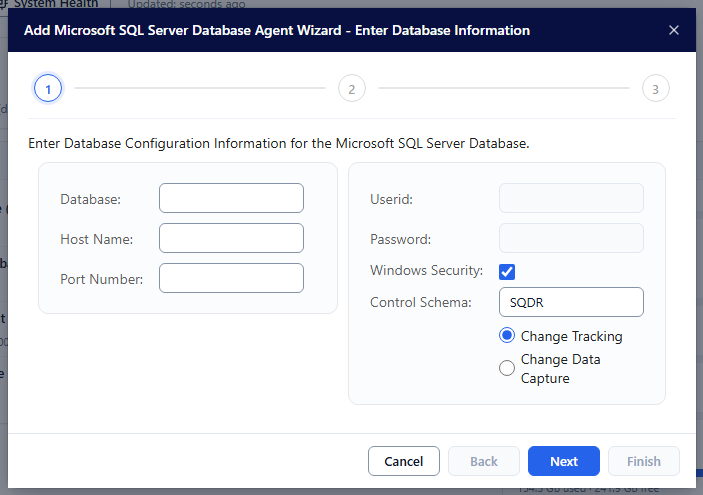
| Option | What it does | Default | When to change it |
|---|---|---|---|
| Database | An agent captures one database: for another database on the same SQL Server, add another agent. | — | — |
| Host Name | For a named instance, host\instance. |
— | — |
| Port Number | Empty uses the default port 1433, or finds a named instance through the SQL Server Browser. | — | When SQL Server listens on another port. |
| Windows Security | Connects as the Windows account the Stelo Capture services run as (see Choose the login). | selected | Clear it to use a SQL Server login; always in the Docker container and for Azure SQL Database. |
| Control Schema | The schema in the source database for the agent's control objects. Converted to upper case. | SQDR | When another Stelo Capture system already uses SQDR in this database, or you add a second agent for it. |
| Change Tracking / Change Data Capture | How the agent gets the changes (see Choose Change Tracking or Change Data Capture). Change Data Capture sets the property msSqlChangeTracking to false. |
Change Tracking | Choose Change Data Capture for tables that have a unique index but no primary key, or when the database already uses CDC. |
Next already changes the database
Next connects to the database and checks the control schema. With Change Data Capture selected, it also
turns on Change Data Capture for the database (sys.sp_cdc_enable_db) at this point. Cancelling the wizard
afterwards doesn't undo it.
If the control schema holds an SQDR Plus v3 agent, the wizard offers to manage that agent remotely (see An existing agent in the control schema).
Step 2: Control DB
<New Control DB> creates a staging database for this agent; an existing one puts the agent in it, in its own schema. See Step 2: Control DB.
Step 3: Logging
The defaults send no email. See Step 3: Logging.
Finish sets up the database for the capture method you chose (see What Finish does on the source) and creates the agent Stopped.
What Finish does on the source
With Change Tracking, the wizard:
- Turns on snapshot isolation for the database (
ALLOW_SNAPSHOT_ISOLATION ON) if it's off. - Turns on Change Tracking for the database if it's off, with a retention of two days and automatic cleanup
(
CHANGE_RETENTION = 2 DAYS, AUTO_CLEANUP = ON). If Change Tracking is already on, its settings are kept. - Creates the control schema if it doesn't exist.
With Change Data Capture, it turns on Change Data Capture for the database if it's off and creates the control schema if it doesn't exist.
It then registers the agent (see Finish the wizard). The agent's
connection string (property sourceDbUrl) includes trustServerCertificate=true: the connection is encrypted (the SQL
Server JDBC driver encrypts by default), but the server's certificate isn't checked. To check it, see SSL/TLS to a SQL
Server source.
Check that capture is running
- Select the agent in the tree and click Start/Restart (see Start the agent). The first start can take a few minutes.
- On the agent's Summary tab, the agent shows Running, its worker shows no error, and the log position moves forward as the database changes.
- If not, the agent's Diagnostics tab shows why. For Change Data Capture, also
check that the SQL Server Agent job is running:
EXEC sys.sp_cdc_help_jobs;in the source database lists the capture and cleanup jobs.
After the first baseline
After you create the SQDR source, add tables to an incremental group and run its first baseline, check:
- The agent's Subscriptions tab lists them, and the source's Agent Summary tab in the Data Replicator Manager shows the agent's status.
- With Change Tracking,
SELECT OBJECT_NAME(object_id) FROM sys.change_tracking_tables;lists the tables the agent tracks.
Create the SQDR source
In the Data Replicator Manager, create a source for the same database:
- Connection: the Microsoft ODBC Driver 17 or 18 for SQL Server, or the SQDR bundled SQL Server driver, with a connection string from the SQL Server template (see Connection string).
- Login: the Replicator Service's own login, separate from the agent's, with at least
SELECTon the tables to replicate. With Windows authentication (Use Integrated Security), the Replicator Service connects as the account it runs under (see Authentication). - Incremental replication: when the Replicator Service finds the agent's control schema in the database, the source allows incremental replication from it. Check that Capture Agent Schema is the agent's control schema (see Incremental Replication).
Then set up the destination, following its page under Destinations: it says when to create the incremental group (for Databricks, once the Spark connector runs).
Connection string
With the Microsoft ODBC Driver 17 or 18 for SQL Server, the template is
Server=MYHOST;Database=MyDatabase;Encrypt=No;Trusted_Connection=Yes (Driver 18):
| Keyword | What it does |
|---|---|
Server |
The server: (local) or . for a local default instance, .\SQLEXPRESS for a local named instance, MYHOST, MYHOST\SQLEXPRESS for a named instance, MYHOST,1533 for a port other than 1433. |
Database |
The default database. Subscriptions can still use other databases. |
Trusted_Connection=Yes |
Windows authentication, as the Replicator Service's account. With Use Integrated Security the Replicator Service adds it if it's missing; remove it for a SQL Server login. |
Encrypt |
Yes encrypts the connection and checks the server's certificate; No or Optional doesn't encrypt. ODBC Driver 18 encrypts by default (Yes), so a connection that worked with Driver 17 can fail with a certificate error: install the certificate authority's certificate on the SQDR server, add TrustServerCertificate=Yes, or set Encrypt=No. The Driver 18 template sets Encrypt=No. |
TrustServerCertificate=Yes |
Encrypts without checking the server's certificate: for a certificate from an authority the SQDR server doesn't know, or when you connect with a name or IP address that isn't in the certificate. |
MultiSubnetFailover=Yes |
For an Always On availability group listener or a failover cluster instance: the connection reaches the active node quickly after a failover. |
The SQDR bundled SQL Server driver uses HostName=localhost\SQLEXPRESS;EnableQuotedIdentifiers=1; for destinations
with this driver, choose Insert using ODBC in subscriptions.
To move an existing source or destination to Driver 18, create a new one with it, because the driver of an existing one can't be changed. See Move to ODBC Driver 18.
Azure SQL Database
- Copy the ODBC connection string from the Azure portal (the database's Connection strings), without the user and
password, for example
Server=tcp:myserver.database.windows.net,1433;Database=mydatabase;Encrypt=Yes;TrustServerCertificate=No;Connection
  Timeout=30
. Always includeDatabase. - With the SQDR bundled SQL Server driver:
HostName=myserver.database.windows.net;EnableQuotedIdentifiers=1;Database=mydatabase. - For a destination, set Object Schema to
dbo(or your schema) rather than the user IDuser@account(see Defaults).
Settings
These properties on the agent's Configuration tab are specific to SQL Server (see Properties by source database):
| Property | What it does | Default |
|---|---|---|
msSqlChangeTracking |
true uses Change Tracking, false Change Data Capture. Set by the wizard. |
true |
manageMsCdcCapture |
With Change Data Capture: lets the agent replace a table's capture instance whose columns don't match the table, and drop a second capture instance. With false, the agent fails such a table instead ("Not allowed to disable Capture", "Multiple Capture instances are not supported"). |
true |
msCdcMaxMinutes |
With Change Data Capture: the change window the agent reads at a time, in minutes. | 5 |
minimumDelay |
With Change Tracking: the minimum time between two reads of the changes, in seconds. | 0 |
Data types
The Replicator Service maps SQL Server types to the destination's as described in Data type
mapping. varchar(max), nvarchar(max) and varbinary(max) are treated
as LOBs.
Spatial, hierarchyid and sql_variant columns
SQDR replicates geometry, geography, hierarchyid and sql_variant columns. See
Spatial and hierarchyid columns and
SQL Server sql_variant. SQL Server json columns are replicated as
their text (see JSON columns).
The agent stages geometry and geography values as the SRID followed by the WKB, in a BLOB; hierarchyid as its
path text (such as /1/2.5/) in a VARCHAR(4000); and sql_variant as JSON text in a VARCHAR(16000). SQL Server
converts the values as the agent reads them, so the staging database needs no spatial support. A sql_variant value
whose JSON is longer than 16,000 characters is staged as NULL, and the agent logs a SEVERE message.
Limitations
- Keys. Change Tracking needs a primary key on each replicated table; Change Data Capture a primary key or a unique index. See Tables without a primary key.
- Schema changes. An altered table needs a new baseline: no ALTER processing.
- Retention. If the agent is stopped for longer than SQL Server keeps the changes (Change Tracking retention, CDC cleanup), it loses its position and the tables need a new baseline.
- One agent per database, and with Change Data Capture one capture instance per table (see
manageMsCdcCapturein Settings). - Primary replica only in an Always On availability group.
- Windows Security works only when Stelo Capture runs on Windows, and not for Azure SQL Database.
- sql_variant values whose JSON form is longer than 16,000 characters are staged as NULL (see Spatial, hierarchyid and sql_variant columns).
Troubleshooting
Problems and messages, with their causes and fixes, are in Troubleshooting › SQL Server.