Destination properties
Changes to a destination apply to every subscription and group that uses it.
Saving changes
- Changing the connection closes the destination's connections. When you change the connection string, the authentication method, the user ID or the password, the Replicator Service first connects with the new settings to read the destination's properties. If it can't, nothing is saved (see Testing the connection). Then you confirm Delete Connections: replications and groups using the destination lose their connection.
- Changing the connection resets detected settings. When you save a changed connection, the DBMS type, the
default database and schema and Stream (Using Apply extensions) are set again from the new connection, as for a
new destination, except the Default Parameters: the destination keeps its own unless the DBMS type changed.
With Connection String (driver-specific), the default schema is named after the connection string's
UID(it's kept when there's none). - Existing incremental groups keep their own copy of the parameters: changing the destination's Default Parameters doesn't change them (see Default Parameters). Snapshot subscriptions use the new values.
Basic
Connection Method
The connection type and the data source or driver can't be changed; to use another driver, create a new destination.
- Template replaces the connection string with the template's, and sets the DBMS type to the template's.
- ODBC Driver Connection String: up to 4096 characters; it can refer to secrets as
$$name$$. See Connection strings. - With Remote Credentials, changing the connection string or selecting a template clears the Password (enter it again before saving) and keeps the User ID.
Authentication Method
See Authentication for the methods. The default is Remote Credentials; choose Use Integrated Security for SQL Server destinations with Windows authentication, and Connection String (driver-specific) for logins with a key file, key pair or token, such as BigQuery and Snowflake (see Snowflake key-pair and token authentication).
- User ID is the default owner of the tables that subscriptions create, and needs the permissions to create,
change and fill them. For some platforms it has a special value (for example
tokenfor Databricks); see the destination's page. - Password is stored encrypted in the control database; if you don't change the field, the current password is kept.
- Verify: while the connection is the saved one, a blank Password means the saved password. See Testing the connection.
Advanced
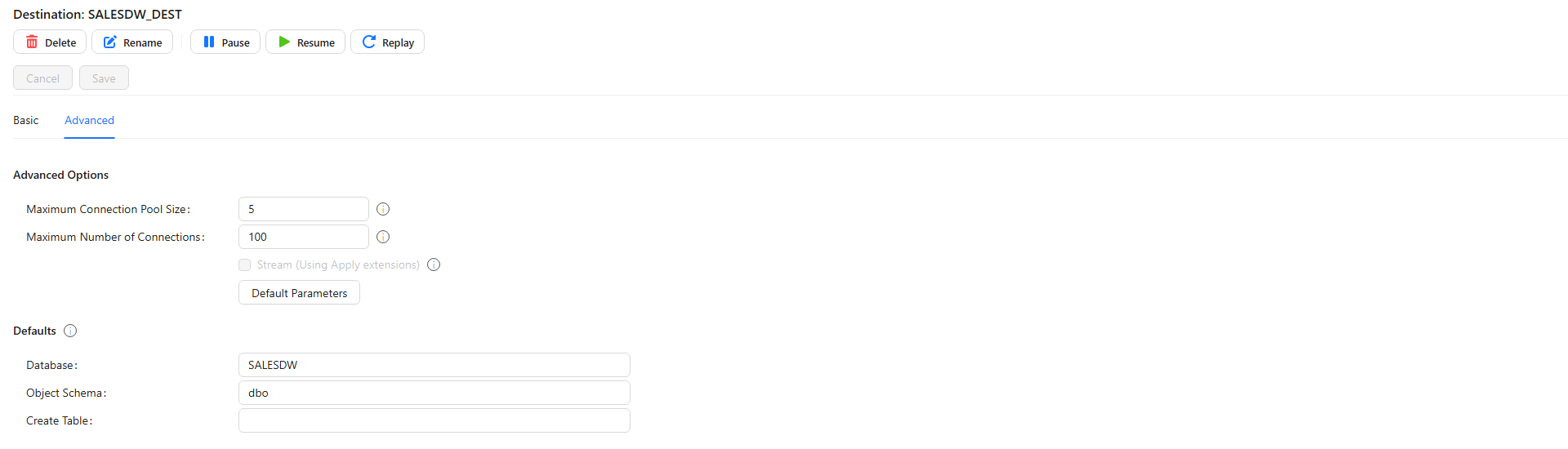
Advanced Options
| Option | What it does | Default | When to change it |
|---|---|---|---|
| Maximum Connection Pool Size | How many unused connections to the destination are kept open for reuse. Pooled connections are closed after the time limit set on the Connection Pools tab of Service settings. 0 keeps none. Must not be larger than Maximum Number of Connections. | 5 | Increase it when many replications to this destination start in quick succession. |
| Maximum Number of Connections | The most connections the Replicator Service opens to the destination at the same time, for this destination definition, separately for snapshot replications and baselines (Destination) and for applying incremental changes (Apply). Further requests wait. At least 1. | 100 | Lower it to limit the sessions on the destination database. |
| Stream (Using Apply extensions) | Read-only. On for destinations whose DBMS type uses a Java connector (Snowflake, Databricks, BigQuery, Microsoft Fabric, Kafka, S3 Tables): incremental changes are handed to a Apply extension, named by the className parameter, instead of being applied by the Replicator Service. See ODBC and Java connectors. |
from the DBMS type | — |
| Default Parameters | The Apply extension and its parameters, used by snapshot subscriptions to the destination and copied into new incremental groups. See Default Parameters. | suggested for BigQuery and Databricks; otherwise empty | To set the Apply extension and its settings before you create groups. |
Default Parameters
The default parameters are key=value pairs. For a streaming destination, className names the Apply extension (a Java
class in Stelo Capture) and the other parameters configure it, for example the Kafka topic and servers, or the cloud
account and credentials.
How they're used. Stelo Capture reads the parameters from the control database when it starts the Apply extension:
- Incremental groups use their own copy, in the group's Parameters (see Group properties), filled in from the destination's Default Parameters when you create the group; Load from Destination reloads it. Changing the destination later doesn't change existing groups.
- Snapshot subscriptions to the destination use the destination's Default Parameters directly.
Editing them:
- Reset to Defaults replaces the parameters with the values suggested for the destination's DBMS type, after you confirm (if the type has any). Use it also to fill them in for a destination created by SQDR 6.x that has none.
- Snowflake login (in Table view when
classNameis the Snowflake Apply extension) sets up the extension's sign-in: Password, Access token (PAT) or Key pair. Choosing one replaces the other types' login parameters with this type's, with secret references ($$name$$) as sample values; see Apply extension parameters. - Write Windows paths with double backslashes (for example
C:\\keys\\file.json). - OK keeps the changes in the form; they're stored only when you Save the page.
Secrets. To keep a password or key out of the parameters, create a secret and give
the parameter the value $$name$$ (the whole value must be the reference). Stelo Capture replaces it with the secret's
value, read from the control database, when it starts the Apply extension.
Apply extensions
The className values offered, and the parameter keys the dialog suggests for them:
Apply extension (className) |
Destination | Parameters suggested |
|---|---|---|
com.starquest.sqdr.apply.snowpipe.SnowFlakeApply |
Snowflake | user, authorization_type, personal_access_token, account, url, database, warehouse, role. For a key pair or a token, see Apply extension parameters. |
com.starquest.sqdr.apply.ApplyPullProcessor |
Databricks | none besides className. This is the default for Databricks destinations. |
com.starquest.sqdr.apply.databricks.AutoLoaderProcessor |
Databricks (Auto Loader) | accountUrl, fileSystemName, directoryPath, tenantId, clientId, clientSecret, utc (false), jdbcUrl, jdbcClientId, jdbcClientSecret. See Auto Loader parameters. |
com.starquest.sqdr.apply.zerobus.ZerobusProcessor |
Databricks (Zerobus, beta) | None suggested: type them in. See Zerobus parameters. |
com.starquest.sqdr.gbq.apply.BigQueryApplyProcessor |
BigQuery | keyFilePath, project. The defaults are taken from the connection string's KeyFilePath and Catalog. |
com.starquest.sqdr.apply.fabric.FabricApplyProcessor |
Microsoft Fabric | landingZone, tenantId, clientId, clientSecret, utc (false) |
com.starquest.sqdr.apply.aws.AwsApplyProcessor |
S3 Tables | region, accessKey, secretKey, bucketARN, streamName, poolSize (10) |
com.starquest.sqdr.apply.kafka.KafkaSparkProcessor |
Kafka | topic, bootstrap.servers, acks, compression.type, client.dns.lookup, session.timeout.ms |
com.starquest.sqdr.apply.kafka.KafkaConfluentAvroProcessor |
Kafka (Confluent, Avro) | topic, topic.partitions_count (1), topic.replication_factor (3), bootstrap.servers, schema.registry.url, and the confluent.* settings for the Confluent cluster, schema registry and cloud API |
The dialog also knows the keys of the other Kafka extensions (KafkaJsonProcessor, KafkaXmlProcessor,
KafkaJsonAvroProcessor, KafkaConfluentJsonProcessor, KafkaConfluentProtobufProcessor, all in
com.starquest.sqdr.apply.kafka), which you can type in as the className.
What each parameter means and how to get the values (accounts, keys, tokens): see the destination's page, Snowflake, Databricks, Google BigQuery, Microsoft Fabric, Kafka or Amazon S3 Tables.
Defaults
Defaults for new subscriptions and incremental groups. Changing Database or Object Schema doesn't affect existing subscriptions.
| Option | What it does | Default | When to change it |
|---|---|---|---|
| Database | The destination database (catalog) preselected in the Subscription Wizard, and the default destination database of new incremental groups. Available only if the destination uses catalogs in table names. | the database name reported by the driver | To create tables in another database by default. |
| Object Schema | The destination schema (owner) preselected in the Subscription Wizard, and the default destination schema of new incremental groups. Available only if the destination uses schemas in table names. | dbo for SQL Server; otherwise the user ID |
To create tables in another schema by default, for example dbo for an Azure SQL Database user named user@account. |
| Create Table | A clause the Replicator Service appends after the column list of the CREATE TABLE statements it builds for this destination. Macros in the clause: ^d the destination table name, ^f the fully qualified name (database, schema and table), and ^~d and ^~f the same without identifier quotes. The statement is rebuilt whenever a subscription's table is created, including each run of a subscription that re-creates its table, so a changed clause then reaches existing subscriptions too. |
empty | To add a DBMS-specific clause to every table SQDR creates in this destination. |