MySQL, MariaDB and Aurora as a source
A MySQL Capture Agent reads the binary log (binlog) of a MySQL, MariaDB or Amazon Aurora MySQL server, the way a replica does, and stages the changes to the tables you replicate. You create it with the Add Capture Agent wizard in the SQDR Control Center, choosing MySQL as the database type for all three. For the steps every source database shares, see Add a Capture Agent. To replicate to MySQL or MariaDB, see Set up a MySQL or MariaDB destination.
Supported configurations
| Supported | |
|---|---|
| Versions | MySQL 5.6 or later; MariaDB 10 or later. See Requirements. |
| Cloud services | Amazon Aurora MySQL, Amazon RDS for MySQL and for MariaDB, Azure Database for MySQL - Flexible Server, Google Cloud SQL for MySQL. Each sets the binary log differently: see MySQL on Amazon, Azure and Google Cloud. Other managed services aren't listed in the requirements: ask Stelo Support. |
| Binary log | On, with binlog_format=ROW. binlog_row_image can be FULL (the default), MINIMAL or NOBLOB. See Turn on the binary log. |
| What an agent captures | The whole server: there's no database field, and the agent can capture tables from any database on the server. |
| Replicas and failover | Connect the agent to the primary server (for Aurora, the cluster's writer): the agent writes to its control database on the server it reads. See Replicas and failover. |
| Agent sign-in | A MySQL user and its password, with caching_sha2_password (the MySQL 8.0 default) or mysql_native_password. With caching_sha2_password, select Use SSL/TLS. See Create the agent user. |
| Encryption | Use SSL/TLS encrypts both of the agent's connections when the server offers TLS; the server's certificate isn't verified. See SSL/TLS. |
| SQDR (Replicator Service) | Connects with MySQL Connector/ODBC, the MariaDB ODBC driver, or the SQDR bundled MySQL driver (MySQL Enterprise only). See Create the SQDR source. |
| Schema changes | Supported (ALTER processing): the agent creates a new staging table for an altered table and flags the member, and the Replicator Service changes the destination table as the group's DDL Replication setting says. A dropped table is reported as dropped. |
| Tables | Each replicated table needs a primary key or a unique index. |
How capture works
The agent records each baseline in its control database and finds that record again in the binary log, which lines the
copy up with the changes it captures. It connects to the server as a replica would, with a server ID of its own, and the
server sends it the binary log, which holds committed transactions only, as it's written. The agent stages the row
changes (inserts, updates and deletes) of the tables you subscribe to, and their TRUNCATE, ALTER TABLE and DROP
TABLE statements. Its position is a binlog file and offset; it doesn't use GTIDs. How a TRUNCATE is applied depends
on the apply method (see Incremental apply options).
Load on the source. The binary log is written whether or not the agent reads it. Each agent adds one replica connection, served by a binlog dump thread, and a database connection. The binlog files stay on disk as long as the server keeps them (see Keep the binary log long enough).
Replicas and failover
- Connect to the primary. The agent writes to its control database on the server it reads (its tables, its
SQTZfunction and its baseline records), so it can't use a read-only replica or an Aurora reader instance. Reading a replica's binary log isn't covered by the requirements: ask Stelo Support. - After a failover. Binlog file names and offsets differ from server to server. When the agent finds it's
connected to another server (the server's
hostnamechanged, for example after a failover behind the same address), it looks up its place in the new server's binary log by time instead, starting from the first event logged at or after the time of the last change it processed. That works only if the new server's binary log holds the changes it received as a replica:log_replica_updatesmust be on (log_slave_updatesbefore MySQL 8.0.26 and in MariaDB; on by default in MySQL 8.0 and later, off by default in MariaDB). Check the replicated tables afterwards. - To choose the position yourself, or to start again with new baselines, see Startup mode and Journal start position.
Before you start
- Stelo Capture is installed and licensed (see Install Stelo Capture and License).
- The server runs a supported version: see Supported source databases.
- The Stelo VM, and the computer where the Replicator Service runs, can reach the MySQL server's port, 3306 by default (see Ports).
- The database administrator has prepared the server (see Prepare the database).
Prepare the database
The database administrator does these steps once, before you add the agent. On a server you manage yourself, follow the first three sections; on Amazon, Azure or Google Cloud, your service's section replaces them. The agent user, SQDR's access and the network are the same everywhere. What differs from server to server is in Binary log settings by server.
Turn on the binary log
The binary log must be on, in row format: only row format logs the values of each changed row. The wizard checks both
(see Step 1). To turn it on, add these lines to the [mysqld] section of the server's configuration file,
then restart the server:
[mysqld]
log-bin=mysql-bin
server-id=1
binlog_format=ROW
- The configuration file is, for example,
C:\ProgramData\MySQL\MySQL Server 8.0\my.inion Windows,/etc/my.cnfor/etc/mysql/my.cnfon Linux, and for MariaDB on Linux/etc/my.cnf.d/server.cnfor/etc/mysql/mariadb.conf.d/50-server.cnf. log-binnames the binlog files. Without a path they go to the server's data directory; with a path, choose a disk with plenty of room, writable by the user the server runs as.server-idis required when the binary log is on in MySQL 5.7. Keep the value if the server already has one.-
binlog-do-dbandbinlog-ignore-db: if the file limits the binary log to some databases, it must include both the source database and the agent's control database (SQDRby default). The agent finds its own entries in the binary log; without them, a new baseline never finishes synchronizing. For example:binlog-do-db=mydatabase binlog-do-db=SQDR
To check, run the following: @@log_bin must be 1 and @@binlog_format must be ROW.
SELECT @@log_bin, @@binlog_format;
SHOW BINARY LOGS;
Keep the binary log long enough
The agent reads the binlog files in order. If the server removes a file before the agent has read it, for example while the agent is stopped, the agent can't continue ("Could not find first log file name in binary log index file") and its incremental subscriptions need new baselines. If the files are never removed, they fill the disk.
-
Keep the files longer than the agent may be stopped:
binlog_expire_logs_secondsin MySQL 8.0 and later (default 2592000, 30 days),expire_logs_daysin MySQL 5.7 and MariaDB. For example:[mysqld] binlog_expire_logs_seconds=259200 -
To remove files sooner yourself, see Remove binlog files yourself.
Let the agent create its function
On its first start, the agent creates a function, SQTZ, in its control database. It returns the server's time zone
offset, for the @tz capture metadata column. While the binary
log is on, MySQL lets a user without the SUPER privilege create functions only when
log_bin_trust_function_creators is on. Turn it on before the agent's first start (no restart needed):
SET GLOBAL log_bin_trust_function_creators = 1;
After the agent has started once and created the function, you can set it back:
SET GLOBAL log_bin_trust_function_creators = 0;
If it's off at the first start, the agent's diagnostics show "You do not have the SUPER privilege and binary logging is enabled": turn it on and restart the agent.
Create the agent user
The agent connects as a MySQL user that you enter in the wizard. Create it, for example as root in the mysql
client:
CREATE USER 'SQDR'@'%' IDENTIFIED BY 'mypassword';
GRANT ALL ON SQDR.* TO 'SQDR'@'%';
GRANT GRANT OPTION ON SQDR.* TO 'SQDR'@'%';
GRANT SHOW DATABASES, REPLICATION SLAVE, REPLICATION CLIENT ON *.* TO 'SQDR'@'%';
GRANT SELECT, SHOW VIEW ON mydatabase.* TO 'SQDR'@'%';
SQDR in SQDR.* is the control database, named after the wizard's Control Schema in upper case; mydatabase
holds the tables you replicate (repeat the last statement for each database).
For a user with caching_sha2_password, the MySQL 8.0 default, select Use SSL/TLS in the wizard. Why the agent
needs each privilege, and SSL/TLS: see The agent user's privileges and password.
Give SQDR access to the control tables
The Replicator Service connects to the source as its own user, which needs SELECT on the tables you replicate. It
finds the Capture Agent through the agent's SQ_PROPERTIES table: without access to it, Allow Incremental Replication
from this Source isn't available when you create the source (see Incremental
Replication). The agent doesn't grant that access on MySQL. After the
agent has started once, grant it, as the agent user or root (sqdruser is the SQDR source's user):
GRANT SELECT ON SQDR.SQ_PROPERTIES TO 'sqdruser'@'%';
Tables and network
- Each table you replicate needs a primary key or a unique index.
- A firewall between the source and the Stelo VM, or the Replicator Service's computer, must let the server's port through (3306 by default; see Ports).
The agent user's privileges and password
| Privilege | Why the agent needs it |
|---|---|
ALL on the control database |
To create the control database, its tables and its function. |
GRANT OPTION on the control database |
To grant other users access to its control tables (property grantees). |
SHOW DATABASES |
To list the databases. |
REPLICATION SLAVE, REPLICATION CLIENT |
To read the binary log as a replica and to list the binlog files. |
SELECT, SHOW VIEW on the source database |
To find and read the tables you replicate. |
Password authentication: MySQL 8.0 and later create users with the caching_sha2_password plug-in by default,
which the agent supports. For such a user, select Use SSL/TLS in the wizard: when the server hasn't cached the
user's sign-in (for example, the first time after the server restarts), the password must be sent, which
caching_sha2_password allows only over an encrypted connection or encrypted with the server's public key. Without
SSL/TLS, the agent's database connection doesn't ask for the public key and can fail with "Public Key Retrieval is not
allowed". Don't switch the user to mysql_native_password: MySQL 8.0 deprecated it, MySQL 8.4 turns it off by
default, and MySQL 9.0 removed it.
Add the Capture Agent
In the SQDR Control Center, click Add Capture Agent and choose MySQL, also for MariaDB and Aurora MySQL.
Step 1: Database
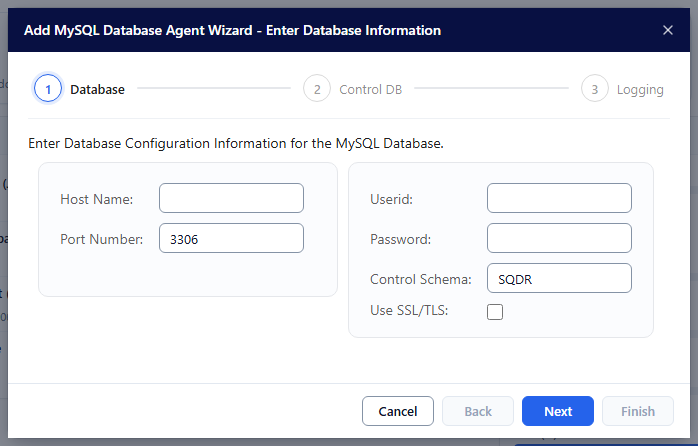
An agent captures from the whole server, so there's no database field.
| Option | What it does | Default | When to change it |
|---|---|---|---|
| Userid | See Create the agent user. | — | — |
| Control Schema | The MySQL database (schema) that holds the agent's control tables. The agent is named after it (<control schema>@<host>). Converted to upper case. |
SQDR | When another Stelo Capture system already uses SQDR on this server, or you add a second agent for it. |
| Use SSL/TLS | For the database connection and for reading the binlog (property useSSL). The server's certificate isn't verified, so no certificate is needed on the SQDR Control Center's Certificates tab. See SSL/TLS. |
cleared | When the connection must be encrypted, and for a user with caching_sha2_password (see Create the agent user). |
Next already changes the database
Next:
- Connects to the binlog as a replica would. If that fails, the wizard stops with the reason.
- Checks
binlog_format. Anything butROWstops the wizard with "Unsupported binlog_format=value. binlog_format=ROW required." - Creates the control database (
CREATE DATABASE IF NOT EXISTS, character setutf8) if it doesn't exist.
Cancelling the wizard afterwards doesn't undo it: the control database stays.
Step 2: Control DB
<New Control DB> creates a staging database for this agent; an existing one puts the agent in it, in its own schema. See Step 2: Control DB.
Step 3: Logging
The defaults send no email. See Step 3: Logging.
Finish registers the agent (see What Finish does) and creates it Stopped.
What Finish does
The wizard registers the agent, with interpretEnum=true so that ENUM and SET values are staged as text (see
Settings). See also Finish the wizard.
Check that capture is running
- Select the agent in the tree and click Start/Restart (see Start the agent). The first start can take a few minutes.
- On the agent's Summary tab, the agent shows Running, its worker shows no error, and the log position, a binlog file and offset, moves forward as the server changes.
- If not, the agent's Diagnostics tab shows why (see
Troubleshooting). On the server,
SHOW PROCESSLIST;, run by a user with thePROCESSprivilege, lists the agent's binlog connection: its user is the agent user and its command isBinlog Dump.SHOW BINARY LOGS;must still list the binlog file of the agent's log position.
After the first baseline
After you create the SQDR source, add tables to an incremental group and run its first baseline, check:
- The agent's Subscriptions tab lists them, and the source's Agent Summary tab in the Data Replicator Manager shows the agent's status.
Create the SQDR source
In the Data Replicator Manager, create a source for one database on the server:
- Connection: MySQL Connector/ODBC, the MariaDB ODBC driver, or the SQDR bundled MySQL driver (MySQL Enterprise only), with a connection string from the template (see Connection string).
- Login: the Replicator Service's own MySQL user, separate from the agent's. It needs
SELECTon the tables to replicate and on the agent'sSQ_PROPERTIEStable (see Give SQDR access to the control tables). - Incremental replication: when the Replicator Service finds the agent's control database on the server, the
source allows incremental replication from it. Check that Capture Agent Schema is the agent's control database,
such as
SQDR(see Incremental Replication).
Then set up the destination, following its page under Destinations: it says when to create the incremental group (for Databricks, once the Spark connector runs).
Connection string
| Driver | Connection string | Notes |
|---|---|---|
| MySQL Connector/ODBC | SERVER=myhostip;PORT=3306;DATABASE=mydb;FOUND_ROWS=1;NO_SSPS=1 |
Keep FOUND_ROWS=1: otherwise MySQL reports an UPDATE that sets a row to its current values as 0 rows changed, and the Batch and Sequence apply methods flag it as a row not found (see How Batch works). Keep NO_SSPS=1 (no server-side prepared statements). TLS with certificate validation: add SSLMODE=VERIFY_CA;SSLCA=C:\certs\ca-bundle.pem. |
| MariaDB ODBC driver | SERVER=myhostip;PORT=3306;DATABASE=mydb;OPTIONS=2;CHARSET=utf8 |
OPTIONS=2 is the MariaDB driver's equivalent of FOUND_ROWS=1; keep it. TLS: add FORCETLS=1;SSLCA=C:\certs\ca-bundle.pem. |
| SQDR bundled MySQL driver | HostName=myhostip;PortNumber=3306;Database=mydb |
MySQL Enterprise only. |
Always set the database (DATABASE= or Database=): it's the connection's default database. For MySQL and MariaDB
sources, the Replicator Service adds NO_CACHE=1 (unless your string sets it), so large results don't have to fit in
memory.
Settings
These properties on the agent's Configuration tab matter for MySQL sources (see Properties by source database):
| Property | What it does | Default |
|---|---|---|
interpretEnum |
true stages ENUM values as their text and SET values as a comma-separated list of names; false stages the numbers MySQL stores. |
false; the wizard sets true |
lowerCaseTables |
Gives the agent's control tables in the source lower-case names. Needed where upper-case table names aren't allowed, such as Azure Database for MySQL. | false |
suppressNoOpUpdate |
Drops updates that don't change any value. | true |
To start reading the binlog from a given file and position or time, for example after switching to another server, see Startup mode.
SSL/TLS
For an existing agent, on its Configuration tab, add the property useSSL with
the value true, and remove useSSL=false (with the & that follows it) from the sourceDbUrl property; saving
restarts the agent if it's running.
With useSSL=true, the agent asks for TLS on both its connections:
- Reading the binlog: the replication connection uses TLS if the server supports it ("preferred" mode).
- Database connection: the wizard leaves
useSSL=falseout of the connection string, so the MySQL JDBC driver's default applies.
In "preferred" mode the connection is encrypted when the server offers TLS, and the server's certificate isn't verified. The server itself must have TLS set up; see your database's documentation. For other TLS requirements, such as verifying the server's certificate, contact Stelo Support.
Data types
The Replicator Service maps MySQL types to the destination's as described in Data type
mapping, including MySQL's unsigned integers, BIT(n) and TIME(n).
ENUM and SET values are staged as text (interpretEnum, see Settings). TEXT and BLOB columns are
LOBs: the agent doesn't stage their values, and the Replicator Service reads them from the source table (see LOB and
long columns). JSON columns are replicated as their text, and the agent stages
that text (see JSON columns).
Column defaults and AUTO_INCREMENT
The Replicator Service doesn't give the destination columns the source's default values or AUTO_INCREMENT: the source
has already set these values, and they're replicated (see What isn't
copied). If applications also insert rows at the destination and need the
defaults, add them yourself. For a Db2 destination, this query on the MySQL source writes the ALTER TABLE ... ALTER
COLUMN ... SET DEFAULT statements for a schema (replace myschema); run its output at the destination, for example
with Run SQL Scripts for Db2 for i. It changes the MySQL date default 0000-00-00, which Db2 doesn't accept, to
1900-01-01.
SELECT CONCAT('ALTER TABLE ', UPPER(TABLE_SCHEMA), '.', UPPER(TABLE_NAME),
       ' ALTER COLUMN ', UPPER(COLUMN_NAME), ' SET DEFAULT ',
       CASE DATA_TYPE
         WHEN 'datetime' THEN CONCAT('''', COLUMN_DEFAULT, '''')
         WHEN 'date'     THEN CONCAT('''', IF(COLUMN_DEFAULT = '0000-00-00', '1900-01-01', COLUMN_DEFAULT), '''')
         WHEN 'time'     THEN CONCAT('''', COLUMN_DEFAULT, '''')
         WHEN 'enum'     THEN CONCAT('''', COLUMN_DEFAULT, '''')
         WHEN 'char'     THEN CONCAT('''', COLUMN_DEFAULT, '''')
         WHEN 'varchar'  THEN CONCAT('''', COLUMN_DEFAULT, '''')
         ELSE COLUMN_DEFAULT
       END, ';')
  FROM information_schema.COLUMNS
 WHERE TABLE_SCHEMA = 'myschema' AND COLUMN_DEFAULT IS NOT NULL;
With a Db2 for i destination, index names must also be unique in the schema (see Troubleshooting › MySQL).
Limitations
- Row format. The binary log must be on, in
ROWformat. See Turn on the binary log. - Keys. Each replicated table needs a primary key or a unique index. See Tables and network.
- Retention. If the server removes binlog files the agent hasn't read, it loses its position and the tables need new baselines. See Keep the binary log long enough.
- Binary log filters.
binlog-do-dbandbinlog-ignore-dbmust let the control database through, or baselines never finish synchronizing. See Turn on the binary log. - Primary server only: the agent writes to its control database on the server it reads. See Replicas and failover.
- Schema changes. ALTER processing doesn't reproduce column positions (
ADD COLUMN FIRST/AFTER), and key changes need a new baseline. See ALTER processing. caching_sha2_passwordwithout SSL/TLS can fail after the server restarts. See Create the agent user.
Troubleshooting
Problems and messages, with their causes and fixes, are in Troubleshooting › MySQL and MariaDB.