Db2 for LUW as a source
A Db2 for Linux, UNIX and Windows (LUW) Capture Agent reads the source database's recovery log and stages the changes to the tables you replicate. You create it with the Add Capture Agent wizard in the SQDR Control Center, choosing IBM UDB LUW as the database type. For the steps every source database shares, see Add a Capture Agent. To replicate to Db2 for LUW, see Set up a Db2 for LUW or Db2 for z/OS destination.
Supported configurations
| Supported | |
|---|---|
| Db2 for LUW versions | Db2 for LUW 9.7 or later; the log reader stored procedure needs 10.5 or later. See Requirements. |
| Cloud services | Managed Db2 services aren't listed in the requirements: ask Stelo Support. |
| HADR | The agent creates its control tables in the database and turns on DATA CAPTURE CHANGES for the tables you replicate, so connect it to the primary database, not a standby. How the agent continues after a takeover isn't documented: ask Stelo Support. For HADR of the Stelo VM's own databases, see Run a standby Stelo Capture server with Db2 HADR. |
| pureScale, partitioned databases (DPF) | Not described in the manual or the requirements: ask Stelo Support. |
| Range-partitioned tables | Supported. Adding a data partition is followed; attaching or detaching one makes the table need a new baseline (see Limitations). |
| Logging | Archive logging (LOGARCHMETH1 not OFF): the agent reads the archived log files too. See Archive logging. |
| Agent sign-in | A user that Db2 authenticates (operating system or LDAP) with SYSADM or DBADM authority: only those can read the log. See Users and privileges. When the agent reads the log over ODBC, its authentication type must match the database manager's AUTHENTICATION (see Authentication). |
| Encryption | Use SSL/TLS in the wizard (property useSSL) connects the agent to the Db2 TLS port (SSL_SVCENAME). With the log reader stored procedure, the log records come over that connection. See SSL/TLS to a Db2 for LUW source. |
| SQDR (Replicator Service) | Connects with StarSQL or the IBM Db2 ODBC driver. See Create the SQDR source. |
| Schema changes | Supported (ALTER processing). Activity Db2 doesn't log for a table (after ALTER TABLE ... ACTIVATE NOT LOGGED INITIALLY), and attaching or detaching a data partition, make the table need a new baseline instead. |
| Tables | A primary key or unique index is recommended. Without one, an incremental subscription is keyed by the row's RID, and a REORG of the table makes it need a new baseline; with a Capture Agent earlier than Stelo Capture 7.0, every update or delete does (see Tables without a usable key). Each replicated table needs DATA CAPTURE CHANGES (see Data capture for the tables). |
How capture works
The agent reads the database's recovery log with one of the methods below and stages the changes by transaction. Db2
writes full row images to the log only for tables defined with DATA CAPTURE CHANGES, which the agent turns on when
you subscribe. At the end of the log, the agent waits pollSleepTime (5 seconds) before reading again.
Reading the log over ODBC or with the stored procedure
Both methods use Db2's db2ReadLog API and read the same log; they differ in where it runs.
| Over ODBC (default) | Log reader stored procedure | |
|---|---|---|
| How the agent reads the log | Its native library on the Stelo VM calls db2ReadLog through its own Db2 ODBC (CLI) connection to the database, and Db2 sends the log records over the network. |
It calls the Stelo procedure SQ_READLOG over its JDBC connection. The procedure, an external C routine, calls db2ReadLog on the database server and returns the log records, up to 1 MB per call. |
| Installed on the database server | Nothing. | The StarQuestSP library, in the Db2 instance's function directory. The agent registers the procedures SQ_GET_INITIAL_LRI and SQ_READLOG in its control schema. |
| Db2 for LUW versions and platforms | All supported versions. | Db2 10.5 or later, on Windows, Linux or AIX. |
| Agent's user | SYSADM or DBADM. | SYSADM or DBADM, plus CREATE_EXTERNAL_ROUTINE to register the procedures. |
| Authentication | The ODBC connection uses the agent property udbAuthentication, which must match the database manager's AUTHENTICATION. With SERVER_ENCRYPT and Stelo Capture on Windows Server 2016 or later, it fails unless Db2's GSKit library is on the Launch Agent's path. |
Uses the agent's JDBC connection. Needed for SERVER_ENCRYPT on Windows Server 2016 or later and for CLIENT; recommended for DATA_ENCRYPT. See Other authentication types. |
| How long Db2 keeps the changes | Until the archived log files are deleted (see Archive logging). | The same. |
| Speed | Each read is a remote API call from the Stelo VM. | Faster: the log is read on the database server. |
| Choose it when | Nothing may be installed on the database server, or Db2 is older than 10.5. | Recommended for Db2 10.5 and later when you can install the library: capture is faster, and it's needed for some authentication types. |
Turn on the stored procedure with the property udbReadLogUsingSP (see
Log reader stored procedure).
Before you start
- Stelo Capture is installed and licensed, and you can sign in to the SQDR Control Center (see Add a Capture Agent and License).
- The database runs a supported version of Db2 for LUW (see Supported source databases).
- The network lets the Stelo VM and the Replicator Service reach the Db2 instance's port, typically 50000 (see Ports).
- The database administrator has prepared the database (see Prepare the database). The wizard checks archive logging, not the rest.
Prepare the database
The source's database administrator does these steps once, before you add the agent. The examples use the database
MYDB and the instance owner db2inst1. Run the db2 commands in a Db2 command window (Windows) or as the instance
owner (Linux, UNIX).
Users and privileges
SQDR connect to the database as two users. Db2 authenticates users through the database server's
operating system (or LDAP), so the users must exist there. For the Capture Agent user you can use the instance owner
(for example db2inst1) or a user you create for Stelo Capture.
| User | Where you enter it | Needs |
|---|---|---|
| Capture Agent user | Userid in this wizard | SYSADM or DBADM authority. The least privileges, as tested by Stelo Support: CONNECT and DBADM WITHOUT DATAACCESS WITHOUT ACCESSCTRL. With the log reader stored procedure, also CREATE_EXTERNAL_ROUTINE. |
| Replication user | The source in the Data Replicator Manager | CONNECT, and SELECT on the tables you replicate. |
Why each user needs these: see Why these privileges. For example, for a Capture Agent user
SQDRAGENT and a replication user SQDRREPL:
GRANT CONNECT ON DATABASE TO USER SQDRAGENT;
GRANT DBADM WITHOUT DATAACCESS WITHOUT ACCESSCTRL ON DATABASE TO USER SQDRAGENT;
GRANT CONNECT ON DATABASE TO USER SQDRREPL;
GRANT SELECT ON TABLE MYSCHEMA.MYTABLE TO USER SQDRREPL;
Archive logging
The database must use archive logging, not circular logging: with circular logging, Db2 reuses its log files and the
changes in them are lost to the agent. The wizard checks it: if LOGARCHMETH1 is OFF, it stops with "Database is
using circular transaction logging. Please configure the database for archive logging and then retry the operation."
-
Check the logging method (
LOGARCHMETH1OFFmeans circular logging):db2 get db cfg for MYDB -
To switch to archive logging on disk, set an archive directory (typically on another disk than the active logs), then take a full backup. The change puts the database in backup pending state, and applications can't connect until the backup is done, so no connections may be active:
db2 update db cfg for MYDB using LOGARCHMETH1 DISK:/db2archlogs db2 backup db MYDB to /db2backupsLOGARCHMETH1also accepts other targets, such asTSM:,VENDOR:orUSEREXIT. -
Keep the archived log files until the agent has read them, including over the longest time an agent may be stopped. If a log file the agent still needs is deleted, its subscriptions need a new baseline. See Keeping archived logs for the agent.
- Recommended when the database archives its logs to disk: set an overflow log path, so that Db2 reads archived log files where they are (see Overflow log path).
Data capture for the tables
Db2 writes the full row images the agent needs to the log only for tables defined with DATA CAPTURE CHANGES;
INCLUDE LONGVAR COLUMNS adds the LONG VARCHAR and LONG VARGRAPHIC columns. When you subscribe to or publish a
table, the agent turns this on, unless the table already has it:
ALTER TABLE "MYSCHEMA"."MYTABLE" DATA CAPTURE CHANGES INCLUDE LONGVAR COLUMNS;
On a busy table, or where your policies don't allow the agent to alter tables, see Turn on data capture yourself.
Authentication
Check the database manager's AUTHENTICATION parameter with db2 get dbm cfg:
SERVER(the default): nothing to do.- Any other value: see Other authentication types.
Log reader stored procedure (recommended)
Install the Stelo log reader stored procedure on the database server: it reads the log there instead of through the Db2 ODBC driver on the Stelo VM. See Log reader stored procedure.
Network and drivers
- Open the Db2 instance's port to the Stelo VM and the Replicator Service: the
SVCENAMEofdb2 get dbm cfg, typically 50000; with Use SSL/TLS, the TLS port (SSL_SVCENAME). See Ports. - Nothing else is installed on the database server. The agent uses the IBM Data Server Driver for JDBC and the Db2 ODBC driver of the Db2 for LUW on the Stelo VM. For the Replicator Service's drivers, see Create the SQDR source.
- To encrypt the connections with TLS, see SSL/TLS to a Db2 for LUW source.
Why these privileges
| User | Why |
|---|---|
| Capture Agent user | Db2 lets only SYSADM and DBADM read the log (the db2ReadLog API). The agent also creates its control tables and a function (SQTZ, with EXECUTE granted to PUBLIC) in the control schema, and turns on DATA CAPTURE CHANGES for the tables you replicate. |
| Replication user | SQDR reads the tables for baselines. The agent grants SELECT on its control tables to PUBLIC (property grantees), so this user needs nothing more. |
Turn on data capture yourself
The ALTER TABLE needs a lock on the table. On a busy table it can fail with a lock timeout (SQLCODE -911), and your
policies may not allow it at all. Then the database administrator runs the statement in a maintenance window before
you subscribe; the agent finds data capture on and doesn't alter the table.
Add the Capture Agent
In the SQDR Control Center, click Add Capture Agent and choose IBM UDB LUW.
Step 1: Database
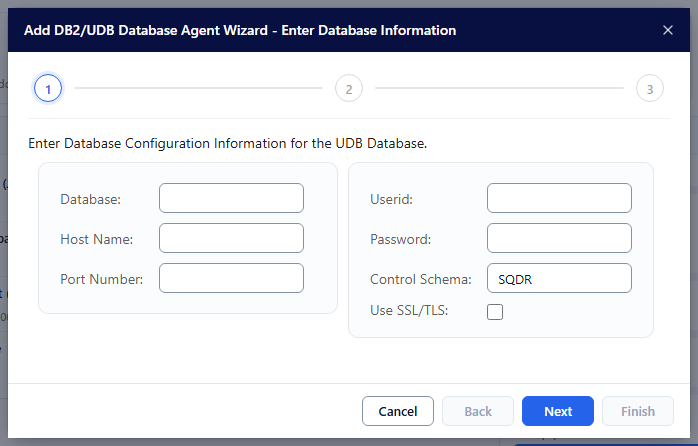
| Option | What it does | Default | When to change it |
|---|---|---|---|
| Database | Converted to upper case. An agent captures one database. | — | — |
| Port Number | Typically 50000; with Use SSL/TLS, the TLS port. | — | — |
| Userid | The Capture Agent user (see Users and privileges). | — | — |
| Control Schema | The schema in the source database for the agent's control tables. Converted to upper case. | SQDR | When another Stelo Capture system already uses SQDR in this database, or you add a second agent for it. |
| Use SSL/TLS | Connects to the source with TLS (property useSSL). Add the certificate of the certificate authority (CA) that issued the Db2 server's certificate on the SQDR Control Center's Certificates tab first (see The Certificates tab): the wizard and the agent check the server's certificate against it. |
cleared | When the connection must be encrypted. |
If the control schema holds an SQDR Plus v3 agent, Next offers to manage that agent remotely (see An existing agent in the control schema).
Step 2: Control DB
<New Control DB> creates a staging database for this agent; an existing one puts the agent in it, in its own schema. See Step 2: Control DB.
Step 3: Logging
The defaults send no email. See Step 3: Logging.
Finish registers the agent (see What Finish does on the source) and creates it Stopped.
What Finish does on the source
- Checks that the user can capture changes: it creates a small test table
SQ4711TEMPin the control schema, turns onDATA CAPTURE CHANGES INCLUDE LONGVAR COLUMNSfor it and inserts a row. - Checks that the database uses archive logging; if
LOGARCHMETH1isOFF, it stops with the circular-logging message (see Archive logging). - Registers the agent and binds the StarSQL packages the Replicator Service uses (see Create the SQDR source; see also Finish the wizard).
Check that capture is running
- Select the agent in the tree and click Start/Restart (see Start the agent).
- On the agent's Summary tab, the agent shows Running, its worker shows no error, and the log position moves forward as the database changes.
-
If not, the agent's Diagnostics tab shows why; "Failed in call to log library" means the agent couldn't read the log (see Troubleshooting). With the log reader stored procedure, check in the source database that the agent registered it (here with the control schema
SQDR): the list includesSQ_GET_INITIAL_LRIandSQ_READLOG.SELECT ROUTINENAME FROM SYSCAT.ROUTINES WHERE ROUTINESCHEMA = 'SQDR';
After the first baseline
After you create the SQDR source, add tables to an incremental group and run its first baseline, check:
- The agent's Subscriptions tab lists them, and the source's Agent Summary tab in the Data Replicator Manager shows the agent's status.
-
In the source database, the subscribed tables have data capture on (
DATACAPTUREisL, orYfor a table whose data capture was turned on withoutINCLUDE LONGVAR COLUMNS):SELECT TABSCHEMA, TABNAME, DATACAPTURE FROM SYSCAT.TABLES WHERE TABSCHEMA = 'MYSCHEMA';
Create the SQDR source
In the Data Replicator Manager, create a source for the same database:
- Connection: StarSQL, with a connection string from the StarSQL template, or the IBM Db2 ODBC driver (see
Connection string). For StarSQL, the agent's Finish
binds the packages in a collection named like the control schema and grants their use to
PUBLIC: use that name forPkgColID(SQDRby default). - Login: the Replicator Service's own login (the replication user in Users and privileges),
separate from the agent's, with
CONNECTandSELECTon the tables to replicate. - Incremental replication: when the Replicator Service finds the agent's control schema in the database, the source allows incremental replication from it. Check that Capture Agent Schema is the agent's control schema (see Incremental Replication).
Then set up the destination, following its page under Destinations: it says when to create the incremental group (for Databricks, once the Spark connector runs).
Connection string
StarSQL
- Db2 for LUW (the UDB template):
HostName=myhost;Port=50000;Server=MYDB;PkgColID=SQDR, with the database name asServer. PkgColIDnames the collection (on Db2 for i, the library) that holds the StarSQL packages.- SSL/TLS (Windows): add
Netlib=SQSSL.DLLand use the server's SSL port, for exampleHostName=myhostip;Netlib=SQSSL.DLL;Port=448;Server=MYRDB;IsolationLevel=2;PkgColID=SQDR.
Docker
Put the certificate authority's certificate in /var/sqdr/certs (see
ODBC drivers in the container). The Replicator Service adds
ICONV4UTF8=Y to StarSQL connection strings on Linux.
The agent's Finish bound the StarSQL packages in a collection named like its control schema. To bind them in another collection, see Bind the StarSQL packages.
IBM Db2 ODBC driver
- Template:
Hostname=myhostip;Port=446;Database=MYRDB;Protocol=TCPIP;LongDataCompat=1;Authentication=SERVER.Databaseis the RDB name on Db2 for i, the database name on Db2 for LUW and the location name on Db2 for z/OS. UseAuthentication=ENCRYPTto encrypt the user ID and password. - LOB columns:
LongDataCompat=1is required to replicate LOB data correctly. For large LOB values, also set the driver'sLOBMaxColumnSizeand the service's Indeterminable-size column limit to the largest size you replicate. - SSL/TLS: add
Security=SSL, the server's SSL port, and the GSKit key database and stash file:SSLClientKeystoredb=C:\mySSLdir\mykeystore.kdb;SSLClientKeystash=C:\mySSLdir\mykeystore.sth. The account the Replicator Service runs as must be able to read the stash file. This driver uses its own key database, not the certificates in/var/sqdr/certsin the container. - The driver doesn't use StarSQL packages.
Settings
These properties on the agent's Configuration tab are specific to Db2 for LUW (see Properties by source database):
| Property | What it does | Default |
|---|---|---|
udbAuthentication |
The authentication type of the ODBC connection the agent reads the log with, when it doesn't use the stored procedure. Set it to the database manager's AUTHENTICATION (see Authentication). |
SERVER |
udbReadLogUsingSP |
Reads the log through the log reader stored procedure on the source, instead of through the Db2 ODBC driver on the Stelo VM. | false |
largestStagedLOB |
The largest LOB value the agent stages. | 100 MB |
udbReorgPollInterval |
How often, in seconds, the agent checks the database's recovery history for INPLACE reorganizations of replicated tables, which give rows new RID values (see The RRN or ROWID column). 0 turns the check off. |
300 |
Data types
The Replicator Service maps Db2 types to the destination's as described in
Data type mapping. For LOB columns (CLOB, BLOB, DBCLOB, XML), see
LOB and long columns and largestStagedLOB in Settings.
LONG VARCHAR and LONG VARGRAPHIC columns are captured only with INCLUDE LONGVAR COLUMNS (see
Data capture for the tables). A Db2 for LUW row's RID() can be replicated as an RRN
column for snapshots only (see RRN and ROWID columns).
Limitations
- Archive logging and retention. The database must use archive logging, and the agent needs every log file from its position on: if one is deleted, the tables need a new baseline. See Archive logging.
- Non-logged activity and partitions. Activity Db2 doesn't log for a table (
ACTIVATE NOT LOGGED INITIALLY), and attaching or detaching a data partition, make the table need a new baseline. - Keys. Without a primary key or unique index, an update or delete makes the table need a new baseline. See Tables without a usable key.
- Data capture. The agent's
ALTER TABLE ... DATA CAPTURE CHANGESneeds a lock on the table. See Data capture for the tables. - Authentication. Reading the log over ODBC needs
udbAuthenticationto match the server, and fails withSERVER_ENCRYPTon Windows Server 2016 or later;CLIENTandDATA_ENCRYPTneed an agent added through a placeholder database, andDATA_ENCRYPTa Launch Agent on Java 8. See Other authentication types. - Log reader stored procedure: Db2 10.5 or later, on Windows, Linux or AIX. See Log reader stored procedure.
- Db2 upgrades. Db2 can't read log files written by an earlier major release: let the agent catch up before you upgrade Db2 (see "Failed in call to log library (RC=-1263)").
- Topologies. HADR: primary database only. pureScale and partitioned databases (DPF): ask Stelo Support. See Supported configurations.
Troubleshooting
Problems and messages, with their causes and fixes, are in Troubleshooting › Db2 for LUW and Db2 for z/OS.