Start, stop and delete a Capture Agent
The actions at the top of a Capture Agent's page start, stop, disable, quiesce or delete the agent. Use them to:
- restart an agent after a configuration change, or to recover a failed agent;
- stop an agent for maintenance, briefly or for longer;
- let an agent stage everything it has read before you stop it;
- delete an agent whose source is no longer replicated, and clean up what it leaves on the source and the server;
- update the Stelo Capture programs on the IBM i after an upgrade (Db2 for i).
To act on several agents at once, see The Stelo VM. With Group agents by host, the actions of a host node apply to all its agents.
Start and stop an agent
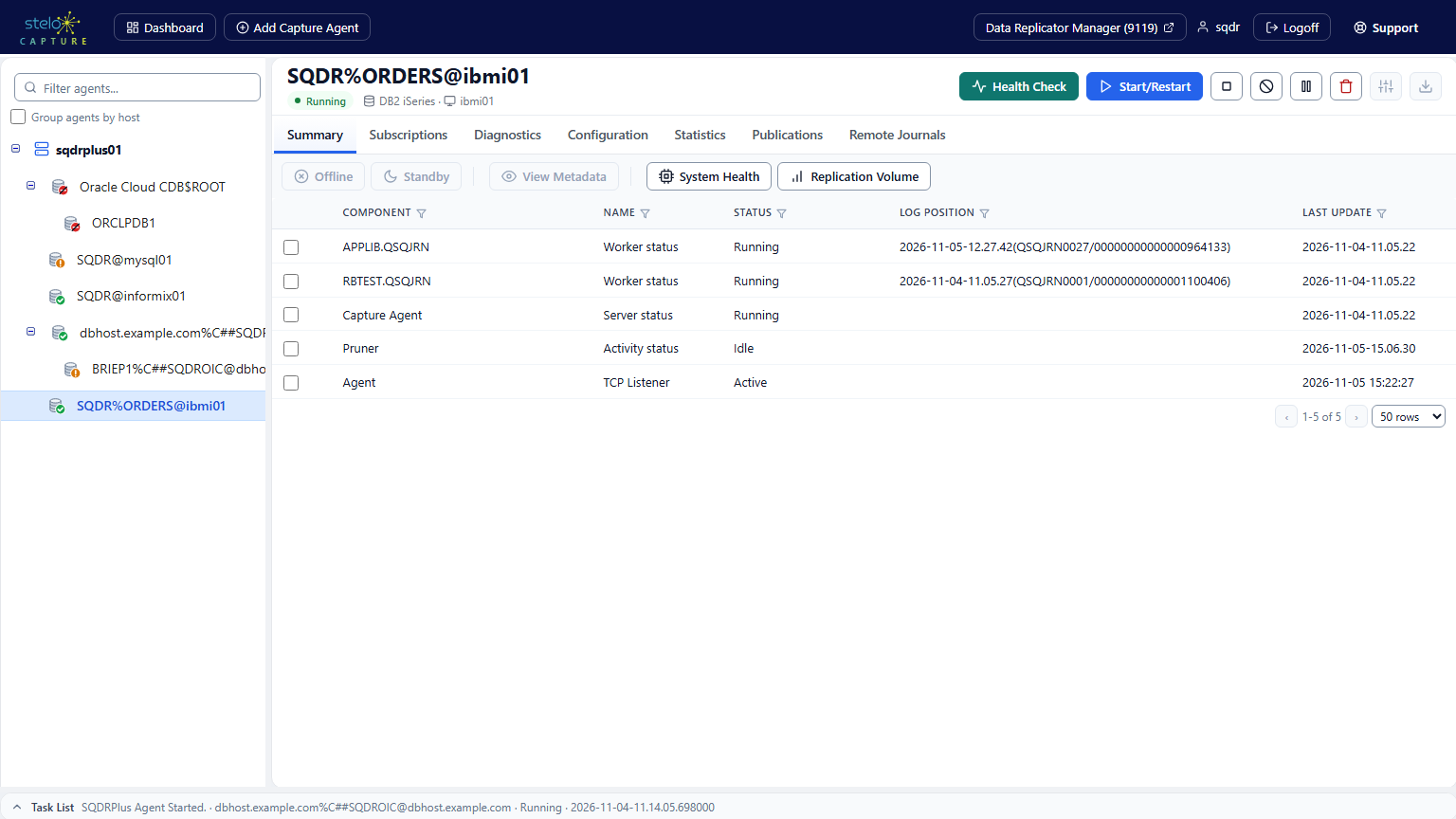
The actions of an Oracle CDB agent (Start/Restart, Stop, Disable, Delete) also apply to its pluggable database agents. An agent in Standby accepts only Disable and Delete ("Operation not allowed in STANDBY state.").
Start or restart an agent
Start/Restart starts the agent; a running agent is stopped and started again. Use it after a change the agent reads only when it starts, or to recover a failed agent.
Every agent that isn't Disabled or in Standby also starts whenever the SQDR Plus Launch Agent service starts. Starting a Disabled agent makes it an ordinary agent again, so from then on it also starts with the Launch Agent.
Stop an agent for maintenance
Stop stops the agent and marks it Stopped. A stopped agent doesn't capture changes, so the Replicator Service gets nothing new from it. When it starts again, it reads the changes made meanwhile from the log or journal, as long as they're still there. Use it for short maintenance. It starts again with the Launch Agent service; to prevent that, use Disable.
Keep an agent stopped
Disable stops the agent if it's running and marks it Disabled, so the Launch Agent doesn't start it when its service starts. Use it for longer outages, an agent you no longer use but don't want to delete yet, or one that fails and would otherwise be restarted. Start it again with Start/Restart.
Stage everything before you stop an agent
Quiesce asks the running agent to quiesce: each worker processes what it has read, then shows Quiesced on the Summary tab and waits. Use it before maintenance, so that everything the agent read is staged before you stop it. See Quiesce.
Delete an agent
Delete an agent when its source is no longer replicated:
- In the Data Replicator Manager, delete the subscriptions that use it, so no incremental group reads from it any more.
- On the agent's Configuration tab, note what you'll need to clean up: the staging database (controlDbUrl), the control schema on the source (sourceDbSchema) and the source user (sourceUserId).
- Stop the agent, then click Delete. The confirmation warns when the agent has dependent agents (an Oracle CDB agent's pluggable database agents), which are deleted too.
- Clean up the source.
Deleting removes:
- the agent from the Launch Agent, its home directory on the Stelo VM, and its staging data: the staging database is dropped if no other agent uses it; otherwise only the agent's schema in it;
- on the source, the agent's log positions and properties, so that the source doesn't keep journal receivers or logs for it.
What stays on the source: the control schema or library with its other objects, the users the wizard created, and other source-side objects such as the Db2 for i exit program or a PostgreSQL replication slot.
If the staging database couldn't be dropped because it was in use, drop it later (see Clean up unused staging databases).
Clean up the source
After deleting the agent, remove what it left on the source when no other agent or application uses it. In the
examples, the control schema is SQDR; use the agent's sourceDbSchema.
| Source | What to remove |
|---|---|
| Db2 for i | The exit program registration (see Remove the Db2 for i exit program). The control library: DLTLIB SQDR, after CHGJOB INQMSGRPY(*DFT) so that journal receivers are deleted without questions. If the agent's user profiles were created for Stelo Capture, delete them with DLTUSRPRF USRPRF(SQDR) OWNOBJOPT(*DLT), which also deletes the objects they own; otherwise keep them, and revoke what was granted to them on journaled tables if you like. Libraries named after the control schema and an ASP number (for example SQDR03) hold journals the agent created for autojournaled tables: delete them once those tables are no longer journaled. Clean up the user and library on the systems of remote journals too. |
| Db2 for LUW | The log reader stored procedure, if installed. The control schema's tables and procedures (SQ_BASELINES, SQ_CATALOG, SQ4711TEMP, TABLEINFO and any others listed in the schema), then the schema: DROP SCHEMA SQDR RESTRICT. Archive logging, if you turned it on only for Stelo Capture. |
| SQL Server | With Change Tracking: turn it off for the tables (ALTER TABLE MySchema.MyTable DISABLE CHANGE_TRACKING) and the database (ALTER DATABASE MyDatabase SET CHANGE_TRACKING = OFF) if nothing else uses it. With Change Data Capture: see Turn off Change Data Capture. Then the control schema's tables and procedures, and the schema (DROP SCHEMA SQDR). |
| Oracle | The agent's user and its objects: DROP USER SQDR CASCADE. With XStream: the outbound server, the XStream administrator and its tablespace. Supplemental logging and archive log mode, if you turned them on only for Stelo Capture. |
| Informix | The control schema and its objects. Database logging and the syscdcv1 database, if you set them up only for Stelo Capture. |
| PostgreSQL | The replication slot and the publication (see Replication slot and WAL): a slot nobody reads keeps WAL until the disk fills. The control schema, the user if it was created for SQDR, and wal_level = logical if you set it only for Stelo Capture. |
| MySQL, MariaDB | Ask Stelo Support. |
Clean up unused staging databases
Each Capture Agent has a staging database in the local Db2 for LUW, named SQDRPn (SQDRP0, SQDRP1, ...). Unused
ones can accumulate: deleting an agent can fail to drop its database if it's in use, and a failed Add Capture
Agent can leave a database without an agent. They take disk space, and each active one takes memory.
Never drop a staging database that an agent uses: that agent becomes unusable. Before you drop one, check that it's unused:
- List the agents' staging databases: the server's Agents tab shows each agent's control database, and an
agent's
controlDbUrlproperty names it (see Configuration properties). Remember that several agents can share one. - List the databases in Db2: in a Db2 command window,
db2 list db directory. A database namedSQDRPnthat no agent uses is a candidate. Skip databases whose name only containsSQDRPand that serve another purpose. - Check that nothing is connected to it:
db2 list applicationsshows no connection to it. - Look at what it was used for: connect to it and run
SELECT * FROM SQDR.SQ_PROPERTIES, then check these values:home: the agent's folder underC:\ProgramData\StarQuest\sqdrplus\conf. If the folder exists, make sure it belongs to another, newer agent.Version: the Stelo Capture version that last used the database. Much older than the installed version means it hasn't been used for a while, unless its agent is disabled.sourceUrlandsourceDriver: the source the database was created for.
When you're sure, drop the database in a Db2 command window, as a user with SYSADM or SYSCTRL authority:
db2 drop db SQDRPn. If it's still active, deactivate it first with db2 deactivate db SQDRPn, but first find out
why it was active.
Start an agent with a recovery option
Startup Mode sets how the agent starts the next time: normally, or with a recovery option. See Startup mode and Recovery.
Update the IBM i programs after an upgrade
Db2 for i only. After you upgrade Stelo Capture:
- Stop the agent.
- Click Update Host and sign in as an IBM i user with the same authority as the installing user (for example QSECOFR).
- Start the agent again.
Update Host copies the Stelo Capture programs of the installed Stelo Capture version to the agent's control library on the IBM i and restores them there. It does the same on the IBM i systems of the agent's remote journals, unless a Stelo Capture agent of their own uses that library.