SSL/TLS to a Db2 for i source
A Db2 for i Capture Agent can connect to the IBM i with TLS (SSL), encrypting the database connection and the journal entries it reads. You need:
- On the IBM i: TLS, with a server certificate assigned to the host servers (see Set up TLS on the IBM i).
- The certificate of the certificate authority (CA) that issued it, on the SQDR Control Center's Certificates tab.
- Use SSL/TLS selected when you add the Capture Agent, or an existing agent changed (see Change an existing agent).
The Replicator Service (SQDR) connects to the IBM i separately; to encrypt that connection, see SQDR connections.
Set up TLS on the IBM i
The IBM i administrator does this part. It needs:
- Digital Certificate Manager (DCM): option 34 of 5770-SS1 (IBM i 7.x; 5761-SS1 on 6.1, 5722-SS1 on V5R4).
- TCP/IP Connectivity Utilities: 5770-TC1 (IBM i 7.x; 5761-TC1 on 6.1, 5722-TC1 on V5R4).
- IBM HTTP Server: 5770-DG1 (IBM i 7.x; 5761-DG1 on 6.1, 5722-DG1 on V5R4).
- The TLS ports open between the IBM i and the Stelo VM: 449, 9470, 9471, 9473, 9475 and 9476 for the Capture Agent, 448 for SQDR (see Ports).
Then:
-
Start the HTTP administration server if
WRKACTJOB JOB(ADMIN)doesn't show it:STRTCPSVR SERVER(*HTTP) HTTPSVR(*ADMIN) -
Open the Digital Certificate Manager in a browser:
http://myibmi:2001/dcm(DCM for i, also linked from IBM Navigator for i), with the IBM i's host name formyibmi. On older releases, use the heritage DCM athttp://myibmi:2001/QIBM/ICSS/Cert/Admin/qycucm1.ndm/main0(disabled by default on current releases). - Get a server certificate: create a local certificate authority (CA) in DCM, or use a certificate from a public certificate authority.
- Create the
*SYSTEMcertificate store, and create the server certificate in it. - Assign the server certificate to the applications that SQDR connect to:
- the IBM i Access host servers (Central, Database, Data Queue, Remote Command, Signon, File and the Host Servers application), which the Capture Agent uses;
- the DDM/DRDA server, which SQDR uses.
- Restart the host servers and the DDM/DRDA server so that they use the certificate, and check with
NETSTAT *CNNthat ports 9470, 9471, 9473, 9475, 9476 and 448 are listening. - Export the CA certificate in Base64 (PEM) format, the text from
-----BEGIN CERTIFICATE-----to-----END CERTIFICATE-----(with a local CA in the heritage DCM: Install Local CA Certificate on Your PC, then Copy and paste certificate). Save it in a file for the Stelo Capture administrator, who adds it on the Certificates tab.
IBM describes these steps in detail, for both DCMs, in Configuring Telnet and Host Servers for Server Authentication with TLS for the First Time.
The Certificates tab
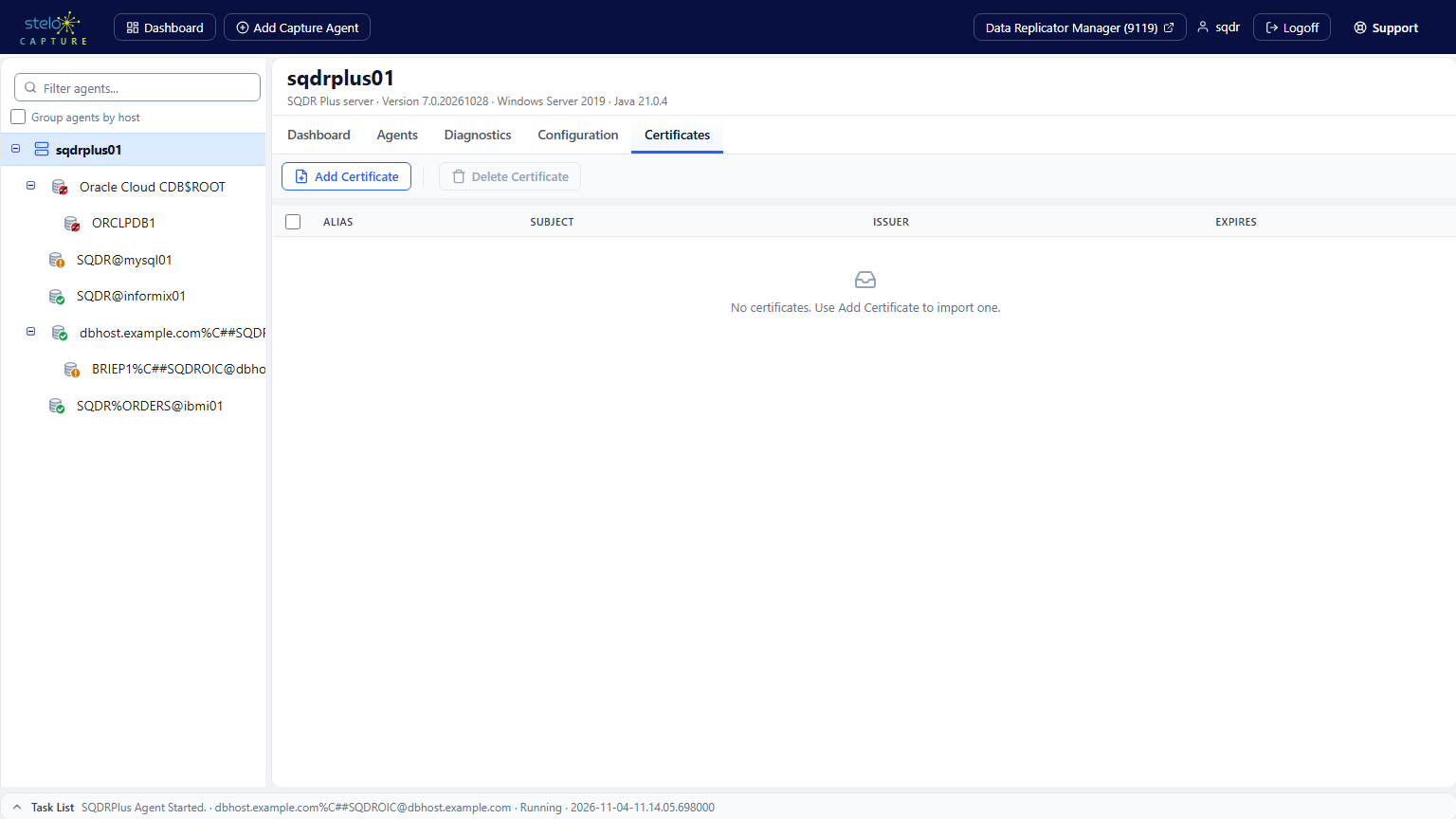
The certificates Stelo Capture trusts are in a keystore on the Stelo VM, shared by the SQDR Control Center and the
Capture Agents: C:\ProgramData\StarQuest\sqdrplus\keyStore on Windows (/var/sqdrplus/keyStore in the Docker
container). A certificate that expires within 30 days is highlighted.
Add a certificate
- Get the CA certificate from your IBM i administrator, in Base64 (PEM) format (from
-----BEGIN CERTIFICATE-----to-----END CERTIFICATE-----). - Click Add Certificate, enter an Alias (for example
MYAS400) and paste the certificate.
A Capture Agent reads the keystore when it starts: restart running agents that need the new certificate
(Start/Restart). If the Add Capture Agent wizard still can't connect with TLS ("unable to find valid
certification path to requested target"), restart the SQDR Plus Jetty service (sqdr+jetty), which runs the SQDR
Control Center.
Change an existing agent to use TLS
- Add the CA certificate on the Certificates tab.
- On the agent's Configuration tab (saving restarts a running agent):
- add the property
useSSLwith the valuetrue; - add
;secure=trueto the end of thesourceDbUrlproperty.
- add the property
SQDR connections
The Replicator Service connects to the IBM i through the source you define in the Data Replicator Manager. To encrypt that connection, use SSL in the source's connection string or data source.
StarSQL. For example:
Server=MYRDB;HostName=myas400;Netlib=SQSSL.DLL;Port=448;IsolationLevel=2;PkgColID=SQDR
IBM i Access. Import the IBM i's CA certificate into the key database of IBM i Access with CWBCOSSL:
-
At a command prompt on the SQDR computer, enter
CWBCOSSL.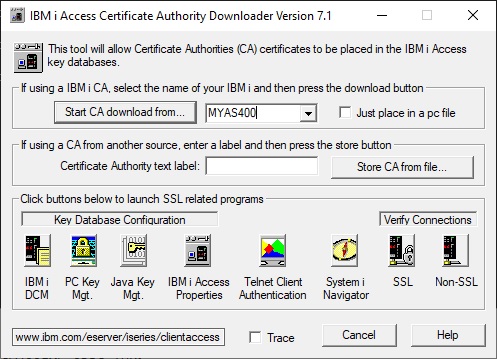
-
Either download the certificate from the IBM i (enter its host name, select Start CA download from..., sign in, with no special authority needed, and confirm that you trust the certificate authority), or import it from a file (enter a name for the certificate authority, select Store CA from file..., choose the file, confirm, and enter the key database password,
ca400unless it was changed). - To verify the connection, select SSL under Verify Connections.
See IBM's Using CWBCOSSL to import a certificate authority into the PC key databases.
Over the internet or from a cloud
When SQDR runs outside the IBM i's network, for example on a virtual machine in Microsoft Azure or Amazon Web Services, use TLS for every connection, and:
- Firewall: let the Stelo VM's addresses through to the IBM i's TLS ports only: 449 (server mapper), 9470, 9471, 9473, 9475 and 9476 (host servers), and 448 for SQDR with StarSQL (see Host servers, ports and jobs). The agent's Host Name and the SQDR source then name the address that forwards to the IBM i; the Database is still the IBM i's RDB name.
-
TCP keepalive: network devices on the way can drop idle connections. Shorten the IBM i's TCP keepalive so that the connections stay open, for example to four minutes for servers in Azure:
CHGTCPA TCPKEEPALV(4)
Check that the connections use TLS
On the IBM i, enter WRKTCPSTS *CNN (or WRKTCPSTS and option 3, Work with IPv4 Connection Status), press
F15 (Subset), enter the Stelo VM's IP address as Remote Internet Address, and press F14 to show the local
ports as numbers. Connections on ports 448 and 947x use TLS; those on 446 and 847x don't.
On the Stelo VM, list the connections to the IBM i:
netstat -n | findstr <IBM i IP address>
See IBM's list of host server ports for the port numbers.
If the connection fails
| Message | Cause |
|---|---|
| SQLState 08001: The application requester cannot establish the connection. (Remote host closed connection during handshake) | The IBM i's server certificate isn't assigned to the host server applications. |
| Unable to find valid certification path to requested target (PKIX path building failed) | The keystore doesn't have the IBM i's CA certificate, or the process that connects was started before you added it: restart the agent, or the SQDR Plus Jetty service for the wizard. |