Manage subscriptions
What you do with subscriptions once they exist: run, stop, duplicate or delete them, and, in a group, copy, move, replay, export and import them. To create subscriptions, see Subscriptions.
The Subscriptions tab
A source's Subscriptions tab lists its subscriptions, snapshot and incremental, with their last run (columns: see Subscriptions lists). Click a subscription to open its properties and change it (see Subscription properties); Insert starts the Subscription Wizard.
Actions
| Button | What it does |
|---|---|
| Run | Runs the selected subscriptions now. A snapshot subscription copies its data; an incremental subscription runs a new baseline. |
| Stop | Stops the selected running subscriptions. The run is recorded as canceled. |
| Duplicate | Copies a snapshot subscription under a new name, keeping the original's destination options unless you choose others (they start on Same). For incremental subscriptions, use Copy Subscription on the group (see Copy or convert). |
| Delete | Deletes the selected subscriptions, their run history, and their membership in any group. The destination table is not dropped. |
Subscriptions in a group
A group's members are its subscriptions.
- Snapshot group: a member is a reference to a snapshot subscription, which belongs to its source and can be in several groups. Removing it from the group doesn't delete the subscription.
- Incremental group: a member is an incremental subscription that belongs to this group only. Removing it deletes the subscription; the destination table is kept.
The order in which members start in a group run is a group setting: see Run Order (incremental) and Subscriptions (snapshot).
The group's Subscriptions tab
| Button | Snapshot group | Incremental group |
|---|---|---|
| Import Subscriptions | Creates snapshot subscriptions from an exported file and adds them to the group. See Export and import. | Creates members from an exported file. See Export and import. |
| Insert Subscription | Adds or removes member subscriptions. See Add members. | Starts the Subscription Wizard for the group. See Add members. |
| Copy Subscription | — | Copies members to another incremental group, or converts them to snapshot subscriptions. The group must be paused. See Copy or convert. |
| Move Subscription | — | Moves members to another incremental group. See Move. |
| Replay Subscription... | — | Applies the member's changes again from an earlier point. The group must be paused. See Replay a member. |
Add members to a group
Snapshot group: Insert Subscription opens the group's member list; new members go at the end of the run order.
Incremental group: Insert Subscription starts the Subscription Wizard with the group's source, destination and default options. Then baseline the new members: see What happens when you save.
Copy or convert (incremental)
Copy Subscription creates new subscriptions from the selected members. Pause the group first.
- Copy to another incremental group (or the same one), for example to replicate the same tables to a second destination. The copy uses the target group's source and destination, with their default database and schema, goes at the end of its run order, and needs a baseline.
- Convert to Snapshot creates a snapshot subscription with the same definition, under the same source and in no group, for a one-time copy of an incrementally replicated table. The original member is unchanged.
| Option | What it does |
|---|---|
| Subscription Qualifier, Prefix / Suffix, Old Qualifier | Decorates the new names: adds the qualifier as a prefix or suffix, replacing Old Qualifier if the name contains it. For example, suffix _EU makes ORDERS into ORDERS_EU. |
| Apply To | A subscription name must be unique within its source, so for Convert to Snapshot, decorate the subscription name. |
| Destination options | Same keeps each member's own value; Override apply options covers only the incremental apply options. |
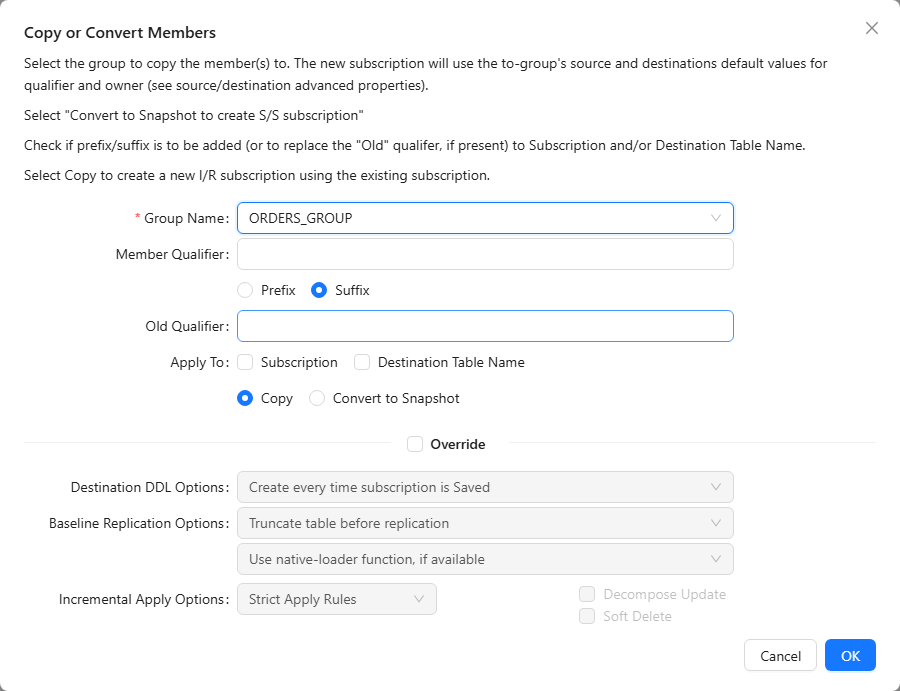
A copy fails if the target group already has a subscription for the same source table, or the source already has a subscription with the new name.
Move (incremental)
Move Subscription moves the selected members to another incremental group with the same source and destination, for example to split a group so that some tables get their own poll interval. Only paused groups are offered as targets: pause the target first. The members keep their statistics, go at the end of the target's run order, and don't need a new baseline.
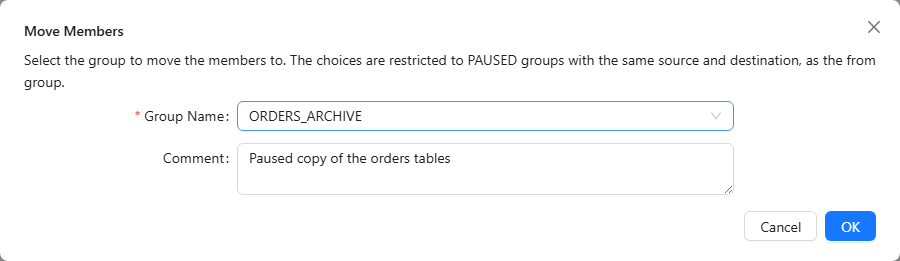
The move fails if the target group already has a subscription for the same source table.
Replay a member (incremental)
Replay Subscription... applies a member's changes again from an earlier position, to repair a destination table after changes were lost or applied wrongly, without a new baseline. Pause the group first. To replay the whole group, use Replay on the group (see Manage incremental groups).
Export and import
Export a group's member definitions to a file and import them into another group, for example to copy a configuration from a test server to production. Both group types can be exported and imported, and a file from either can be imported into either.
Export on the group downloads a JSON file with every member's definition (columns, indexes, constraints) in run order.
Import:
- On the target group's Subscriptions tab, click Import Subscriptions and choose the exported file.
- Choose the destination Database and Object Schema for the new members (default: the group's defaults, and (same) for the schema), and the destination options (they start on Same: the file's values). For a snapshot group, the source and destination come from the group's Import Defaults when it has them, otherwise from the file. A subscription from an incremental group imported into a snapshot group is converted, as with Convert to Snapshot.
- Select the subscriptions to import. Those whose name already exists in the source, or whose table is already in the group, can't be selected: the import never overwrites a subscription.
- Baseline the new members.
The database types must match. Column data types belong to the databases a subscription was exported from: one from a Db2 for i source to a SQL Server destination works only with a Db2 for i source and a SQL Server destination. Subscriptions whose source or destination type doesn't match the target group's are listed with the reason and left out. Files exported before 7.0, which don't record the types, aren't checked.
The table comes from the exported CREATE. When an import, or a copy to a destination of the same database type,
creates the destination table, it runs the CREATE statement recorded with the subscription, then reads the column
types back from the table. So the table is the same even when this Replicator Service reaches the destination database
through another ODBC driver than the one the subscription was exported with.
Related
- Subscriptions: the Subscription Wizard
- Subscription properties
- Manage incremental groups and Manage snapshot groups