Replication events
The Replication Events tab of a group or subscription is its run history: one row per run, with its duration, how much it copied, its result, and the messages the Replicator Service wrote during the run. Look here first when a run failed or took longer than usual.
How it works
The Replicator Service records every run in the control database:
- Group run (snapshot group, or an incremental group baselining its members): one entry for the group, and one for each member that ran.
- Subscription run on its own: one entry.
- Incremental groups and members: the service counts the rows and bytes applied since the last reset (the statistics period), shown live as the first row of the history. When a group run ends, the counters are saved as a History entry and restart from zero; they're also saved when the Replicator Service stops. See Incremental history.
Entries are kept until pruned (see How long history is kept) or deleted (see Delete Statistics). The last run of each group and subscription is always kept.
Group replication events
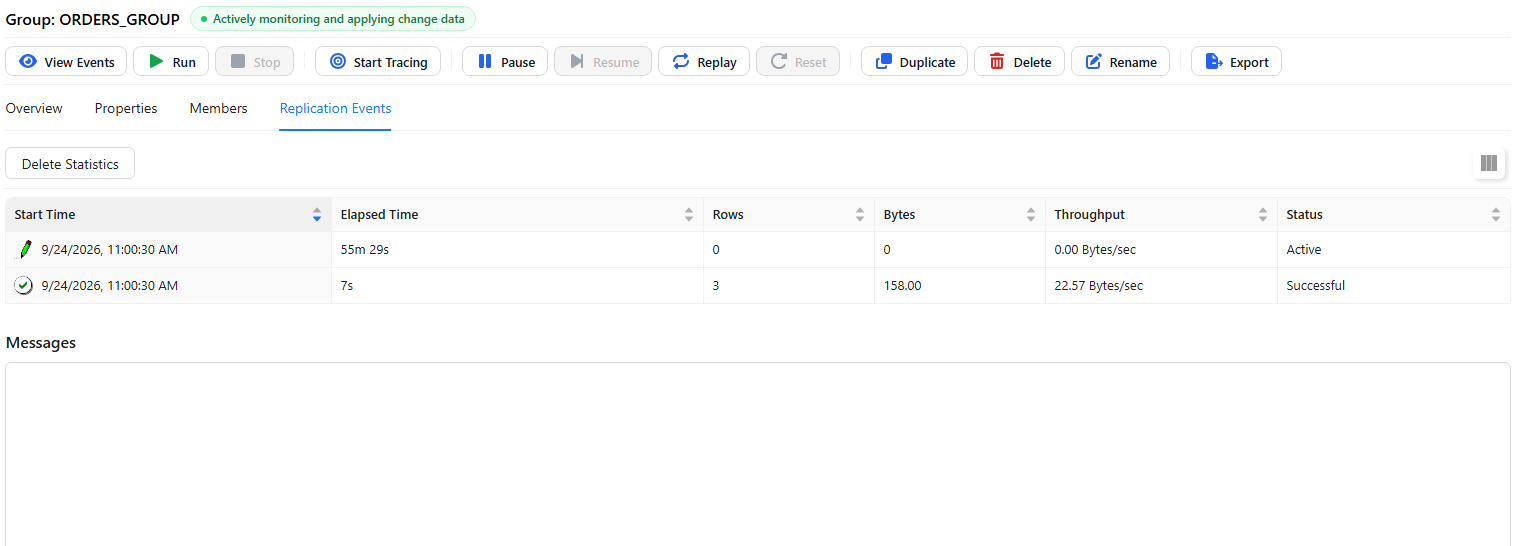
The tab lists the group's own entries: one per group run, plus, for an incremental group, its live counters and History entries. Each member's results are in the member's own replication events.
While the group runs, its first row is the run in progress, updated at every refresh, with the rows and bytes its members copied so far (see Progress of a running group for what they include).
Member start times in a group run
In a group run, members wait their turn (up to the group's Maximum Subscriptions at a time). A member's entry starts when the member starts to work: when its copy begins, or when it drops foreign keys before the copy. Its Elapsed Time is then its own work, and its messages begin with "Started in group" at that time. A member with nothing to do in a phase of the run doesn't count as started then; one that fails to start is recorded when it fails.
Subscription replication events
The tab lists every run of the subscription, on its own and in any group. The first row is:
- while the subscription runs, the run in progress (Running), with the rows and bytes copied so far;
- for an incremental subscription, its live counters (Active, Active (Flagged), Stopped or Error).
The list always includes the subscription's last run. While it runs, that's the run in progress as of its last commit: status Running (committed), with the rows and bytes committed so far and that commit's time as its end time. So a running subscription shows both rows. A group's Subscriptions tab shows only the Running (committed) row for a member that's running.
Columns and messages
- Start Time: for incremental counters, when the statistics period started. For a member in a group run, when the member started to work, not when the group run started (see Member start times in a group run).
- Elapsed Time: for the live row, the time since it started.
- Throughput: bytes per second; for incremental counters, over the time spent applying changes.
- Status: see Run results.
Messages
Messages holds everything the Replicator Service wrote during the selected run: what it did, warnings, and the full text of any error, starting with the component that reported it (for example the ODBC driver).
For an incremental group's live row, the messages are the group's status message (see Group status messages). A traced run's recording is at the end of its messages.
Run results
| Status | Meaning |
|---|---|
| Successful | The run completed. An incremental group run with nothing to baseline is also successful. |
| Successful with warnings | For example truncated data. Read the messages. |
| Replication failed | The run failed, including before it started. Read the messages; see Understanding replication error messages. |
| Suspended | A baseline with Manual synchronization prepared the destination and stopped. Load the table, then run it again to complete it. See Baseline Replication Options. |
| Active | Incremental counters: the group or member receives changes. |
| Active (Flagged) | Incremental counters: the member receives changes but has had unexpected results (see Member status). |
| Stopped | Incremental counters: the group is paused, or the member waits (for a baseline, for a run after an ALTER, or for its group). |
| Error | Incremental counters: the group is retrying after a polling error, or the member's source table was dropped or the member is broken. |
| History | Incremental counters saved when a group run ended or the Replicator Service stopped; its message says which. |
| None | (Lists only) No run recorded yet, or the history was deleted. |
The Last Status column of the groups list and the Status column of the member and subscription lists use the same values.
Incremental history
The counters of an incremental group and of each member are saved as a History entry and reset to zero:
- when a group run ends successfully or with warnings, for the group and each member it baselined (message "Incremental statistic counters are reset.");
- when the Replicator Service stops, if any rows were applied (message "Non-zero incremental statistic counters saved at service shutdown.").
Reset on the group deletes its statistics (see Incremental groups).
How long history is kept
Run history lives in the control database, which grows with every run. The Replicator Service prunes it regularly, as set under History Logging on the Logging tab of Service Settings (see Service settings).
No setting removes the last run of each subscription and group: the tab always shows it. The limits apply to the earlier runs (the history), in this order, oldest entries first:
- Each subscription, and each group (its own entries), keeps at most Maximum records per object entries.
- The whole history then keeps at most Maximum history records (total) entries.
| Setting | What it does | Default | When to change it |
|---|---|---|---|
Limit replication history logging (limitHistory) |
Turns pruning on. Cleared, the history is kept forever. | on | Clear it only if you archive or clean up the history yourself. |
Maximum history records (total) (totalHistoryLimit) |
The most history entries kept in total (0 to 1000000). 0 keeps no history: only the last run of each subscription and group. | 5000 | Lower it to keep the control database small; raise it to keep more history. |
Maximum records per object (subscription or group) (subscriptionHistoryLimit) |
The most history entries kept for each subscription and each group (0 to 5000). 0 keeps no history: only the last run of each. | 5 | Raise it to keep more runs of each subscription for comparison. |
pruneFrequency (service property) |
How often pruning runs, in minutes. | 15 | Rarely. See Service properties. |
With the defaults, each subscription and group keeps its last run plus its 5 previous runs, and each pruning cuts the history back to 5000 entries in total. To keep no history, set either limit to 0: a finished run isn't added to the history, and the existing history is deleted at the next pruning. To keep everything, clear Limit replication history logging.
Upgrading to SQDR 7.0: a limit of 0 changed meaning
Before 7.0, a limit of 0 didn't mean "keep nothing": a total of 0 set no total limit, and a per-subscription limit of 0 shared the total among the subscriptions. When the Replicator Service first starts after the upgrade, it rewrites the saved settings to keep about what they kept before: both limits 0 turns Limit replication history logging off; a total of 0 becomes 1000000; a per-object limit of 0 takes the value of the total. Check the Logging tab after upgrading.
Delete Statistics
Deletes run history you no longer need, for example after testing, or to compare runs afresh.
| Where | What is deleted |
|---|---|
| Group | Every run of the group: its own entries and its members' entries for those group runs. The members' other runs (on their own, or in other groups) are kept. |
| Subscription | Every entry of the subscription, on its own or in a group. |
Delete Statistics can't be undone. It deletes only the history: not the live counters of an incremental group or member, nor the last run.