PostgreSQL as a source
A PostgreSQL Capture Agent reads the changes through logical replication (the pgoutput plug-in) and stages them. You
create it with the Add Capture Agent wizard in the SQDR Control Center, choosing PostgreSQL as the database
type. For the steps every source database shares, see Add a Capture Agent. To
replicate to PostgreSQL, see Set up a PostgreSQL destination.
Supported configurations
| Supported | |
|---|---|
| Versions | PostgreSQL 11 or later. See Requirements. |
| Cloud services | Amazon RDS for PostgreSQL, Amazon Aurora PostgreSQL, Azure Database for PostgreSQL - Flexible Server, Google AlloyDB for PostgreSQL: see Amazon RDS and Aurora, Azure and AlloyDB. Other managed services (such as Google Cloud SQL for PostgreSQL) aren't listed in the requirements: ask Stelo Support. |
| Server setting | wal_level = logical, which takes a restart. See Turn on logical replication. |
| What an agent captures | One database. It uses one logical replication slot and one publication, both named after its control schema, and one WAL sender connection. See Replication slot and WAL. |
| Standbys and failover | Connect the agent to the primary: it changes the source database. A replication slot isn't carried over to a standby unless it's a failover slot (PostgreSQL 17 and later). See Standbys and failover. |
| Agent sign-in | A PostgreSQL user and its password (scram-sha-256 or md5 in pg_hba.conf), with the replication privilege, that owns the source database and the replicated tables. See Create the agent user. |
| Encryption | Use SSL/TLS adds ssl=true to the agent's connection string. See SSL/TLS. |
| SQDR (Replicator Service) | Connects with psqlODBC or the SQDR bundled PostgreSQL driver. See Create the SQDR source. |
| Schema changes | Not supported (ALTER processing): an altered table needs a new baseline. |
| Tables | Each replicated table needs a primary key or a unique index. The agent sets its replica identity to FULL. See Tables. |
How capture works
The agent reads its logical replication slot over a replication connection. The slot decodes the write-ahead log (WAL)
with pgoutput, limited to the tables in the agent's publication, and sends each transaction when it commits: its
inserts, updates, deletes and truncates. The agent reports to the server, every 10 seconds, the log sequence number
(LSN) up to which it has staged changes, and the slot keeps the WAL from that position on. How a TRUNCATE is applied
depends on the apply method (see Incremental apply options).
Load on the source. A WAL sender process on the server decodes each agent's slot. With REPLICA IDENTITY FULL,
PostgreSQL writes the whole old row of each update and delete to the WAL, so the WAL of replicated tables grows. The
slot keeps the WAL until the agent has confirmed it (see Replication slot and WAL).
Standbys and failover
- Connect to the primary. The agent changes the source database: the wizard creates the control schema, and the agent creates its control tables and publication and sets the replica identity of the tables you subscribe to. A read-only standby allows none of this.
- Slots after a failover. A logical replication slot exists only on the server where it was created. Unless it was synchronized (below), the new primary has no slot for the agent: the agent creates a new one at the current end of the WAL, and changes made since its last read aren't captured. Start the agent with Force New Baselines (see Startup mode) so that the destinations are complete again.
-
Failover slots (PostgreSQL 17 and later). PostgreSQL can keep a logical slot synchronized to a standby if the slot is created as a failover slot and the standby is set up for it (see Logical replication failover in the PostgreSQL documentation). The agent creates its slot without that option, but uses an existing slot of its name that uses
pgoutput. To have a failover slot, create it before the agent's first start, for the control schemasqdr:SELECT pg_create_logical_replication_slot('sqdr', 'pgoutput', false, false, true);Ask Stelo Support before you rely on it.
Before you start
- Stelo Capture is installed and licensed (see Install Stelo Capture and License).
- The server runs a supported version: see Supported source databases.
- The Stelo VM, and the computer where the Replicator Service runs, can reach the PostgreSQL server's port, 5432 by default (see Ports).
- The database administrator has prepared the database (see Prepare the database).
Prepare the database
The database administrator does these steps once, before you add the agent. On Amazon RDS, Aurora, Azure or AlloyDB, Logical replication on cloud services replaces the first step.
Turn on logical replication
The agent's logical replication slot needs the WAL at the logical level. The wizard doesn't check it; if the level is
lower, the agent fails when it creates its slot.
- Find
postgresql.conf, in the data directory (for example/var/lib/pgsql/16/dataon Linux orC:\Program Files\PostgreSQL\16\dataon Windows).SHOW config_file;shows its location, run as a superuser or a member ofpg_read_all_settings. -
Set:
wal_level = logical -
Restart the server:
wal_leveltakes effect only at a restart.SHOW wal_level;shows the level.
Create the agent user
The agent connects as a PostgreSQL user that you enter in the wizard. On a server you manage yourself, it can be a superuser. Otherwise, use a user that:
- owns the source database, so that the agent can create its control schema and publication in it;
- owns the tables you replicate (or is a member of the role that owns them), so that the agent can change their replica identity and add them to its publication (see Tables);
-
has the replication privilege, to create its replication slot and read the changes (or grant it with pgAdmin):
Server Run, as an administrator Self-managed, Azure, AlloyDB ALTER ROLE myuser WITH REPLICATION;Amazon RDS and Aurora GRANT rds_replication TO myuser;
The SQDR source's user needs only SELECT on the tables you replicate: the wizard grants USAGE on the control
schema to PUBLIC, and the agent grants SELECT on its control tables to PUBLIC (property
grantees).
Tables
- Each table you replicate needs a primary key or a unique index.
- When you subscribe to a table, the agent sets its replica identity to
FULLand adds it to its publication. KeepREPLICA IDENTITY FULL(see Why REPLICA IDENTITY FULL).
Replication slot and WAL
Leave room on the server for the WAL that the agent's slot keeps while the agent is stopped or behind, and give agents for two databases of the same instance different control schemas (see Replication slot and WAL).
Network
- A firewall between the source and the Stelo VM, or the Replicator Service's computer, must let the server's port through (5432 by default; see Ports).
- On a server you manage yourself,
listen_addressesinpostgresql.confand an entry inpg_hba.confmust allow both computers to connect to the source database. The agent's replication connection is a logical one: it matchespg_hba.confentries for the database's name, not thereplicationkeyword.
Logical replication on cloud services
On Amazon RDS, Aurora, Azure or AlloyDB, your service's setting replaces Turn on logical replication, which is for a server you manage yourself (including PostgreSQL on a cloud virtual machine). The agent user, tables, slot and network are the same everywhere.
Amazon RDS and Aurora PostgreSQL
Amazon RDS sets server settings in parameter groups; a default parameter group can't be changed.
- Create a custom parameter group from your version's family (for example
postgres16, oraurora-postgresql16for Aurora): a DB parameter group for Amazon RDS for PostgreSQL, a DB cluster parameter group for Aurora PostgreSQL. - Set
rds.logical_replicationto1. This setswal_leveltological. - Modify the instance (Amazon RDS) or the cluster (Aurora) to use the parameter group.
- Reboot the instance (for Aurora, the writer instance): the parameter is static.
Azure Database for PostgreSQL
In Azure Database for PostgreSQL - Flexible Server, open your server's Server parameters in the Azure portal, set
wal_level to LOGICAL, save, and restart the server.
Google AlloyDB for PostgreSQL
On the primary instance, set the database flag alloydb.logical_decoding to on. AlloyDB restarts the instance when
you set the flag.
Why REPLICA IDENTITY FULL
With REPLICA IDENTITY FULL, PostgreSQL logs the whole old row of every update and delete. Without it, when an update
doesn't change a large variable-length column that PostgreSQL stores out of line ("TOASTed", such as a text,
bytea or jsonb value), PostgreSQL leaves the column's value out of the change; the agent has no value for it, and
the column is replicated empty. If a table's replica identity was changed, set it again, for example
ALTER TABLE sales.orders REPLICA IDENTITY FULL;. Rows already replicated this way need a new baseline.
Replication slot and WAL
- A replication slot keeps the server's WAL until the agent has read it, so the WAL grows while the agent is stopped or
behind. Leave room for it. If
max_slot_wal_keep_sizeis set, a slot that falls further behind loses the WAL it needs, and the agent's incremental subscriptions need new baselines. - The slot and the publication are named after the agent's control schema (see Settings). A slot name must be unique in the PostgreSQL instance: give agents for two databases of the same instance different control schemas.
-
If you delete an agent, drop its slot, and in its database its publication, when you no longer need them, for example:
SELECT pg_drop_replication_slot('sqdr');
DROP PUBLICATION sqdr;
A slot that nothing reads any more keeps the WAL from its position on, so the server's disk fills. Do the same when you delete and create agents again while testing, so that you can reuse their names. pgAdmin also lists and deletes publications. To find slots that hold a lot of WAL, see Troubleshooting › PostgreSQL.
Each agent uses one replication slot and one WAL sender connection. max_replication_slots and max_wal_senders
(10 each by default) limit how many agents, with your other replication, the server can serve.
Add the Capture Agent
In the SQDR Control Center, click Add Capture Agent and choose PostgreSQL.
Step 1: Database
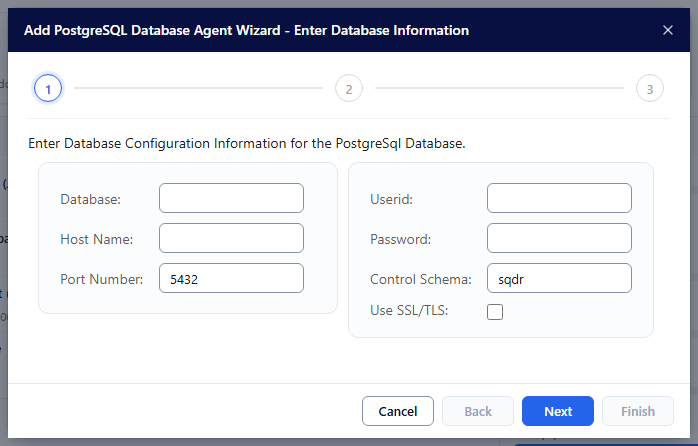
| Option | What it does | Default | When to change it |
|---|---|---|---|
| Database | Converted to lower case. | — | — |
| Userid | See Create the agent user. | — | — |
| Control Schema | The schema in the source database for the agent's control tables. Converted to lower case. It also names the agent's replication slot and publication (see Settings). | sqdr | When another Stelo Capture system already uses sqdr in this database, or you add a second agent for it or for another database of the same instance. |
| Use SSL/TLS | Connects with SSL (ssl=true in the agent's connection string). The PostgreSQL JDBC driver verifies the server's certificate with its own SSL settings, not with the certificates on the SQDR Control Center's Certificates tab: set them up first (see SSL/TLS). |
cleared | When the connection must be encrypted. |
Next already changes the database
Next connects to the database and creates the control schema if it doesn't exist
(CREATE SCHEMA IF NOT EXISTS), then grants USAGE on it to PUBLIC. Cancelling the wizard afterwards doesn't
undo it: the schema stays.
Step 2: Control DB
<New Control DB> creates a staging database for this agent; an existing one puts the agent in it, in its own schema. See Step 2: Control DB.
Step 3: Logging
The defaults send no email. See Step 3: Logging.
Finish registers the agent (see What Finish does) and creates it Stopped.
What Finish does
The wizard registers the agent (see Finish the wizard). When it runs, the agent creates its logical replication slot if it doesn't exist. When you subscribe to a table, it sets the table's replica identity and adds it to its publication, which it creates the first time.
Check that capture is running
- Select the agent in the tree and click Start/Restart (see Start the agent). The first start can take a few minutes.
- On the agent's Summary tab, the agent shows Running, its worker shows no error, and the log position, an LSN, moves forward as the database changes.
-
If not, the agent's Diagnostics tab shows why (see Troubleshooting). On the server, this query shows the agent's slot (here for the control schema
sqdr):pluginispgoutput,activeistwhile the agent runs,confirmed_flush_lsnmoves forward as the agent confirms changes, andwal_keptis the WAL the slot holds:SELECT slot_name, plugin, active, confirmed_flush_lsn, pg_size_pretty(pg_wal_lsn_diff(pg_current_wal_lsn(), restart_lsn)) AS wal_kept FROM pg_replication_slots WHERE slot_name = 'sqdr';
After the first baseline
After you create the SQDR source, add tables to an incremental group and run its first baseline, check:
- The agent's Subscriptions tab lists them, and the source's Agent Summary tab in the Data Replicator Manager shows the agent's status.
- In the source database,
SELECT * FROM pg_publication_tables WHERE pubname = 'sqdr';lists the tables in the agent's publication.
Create the SQDR source
In the Data Replicator Manager, create a source for the same database:
- Connection: psqlODBC or the SQDR bundled PostgreSQL driver, with a connection string from the PostgreSQL template (see Connection string).
- Login: the Replicator Service's own PostgreSQL user, separate from the agent's. It needs
SELECTon the tables to replicate; the agent's control tables are readable by everyone (see Create the agent user). - Incremental replication: when the Replicator Service finds the agent's control schema in the database, the source
allows incremental replication from it. Check that Capture Agent Schema is the agent's control schema, such as
sqdr(see Incremental Replication).
Then set up the destination, following its page under Destinations: it says when to create the incremental group (for Databricks, once the Spark connector runs).
Connection string
| Driver | Connection string | Notes |
|---|---|---|
| psqlODBC | Servername=myhost;Database=mydatabase;Port=5432;MaxVarcharSize=32767;MaxLongVarcharSize=214748364 |
Keep the size options from the template: they set the largest character types the driver reports. TLS: add SSLMode=require, or SSLMode=verify-ca;pqopt={sslrootcert=C:\\certs\\root.pem} to validate the certificate. |
| SQDR bundled PostgreSQL driver | HostName=myhost;Database=mydatabase;PortNumber=5432 |
For destinations the Replicator Service adds BatchMechanism=2, FetchTSWTZasTimestamp=1, MaxCharSize=255, MaxVarcharSize=32767 and MaxLongVarcharSize=214748364. TLS: add EncryptionMethod=1 (EM=1); ValidateServerCertificate=0 (VSC=0) skips validation, or VSC=1;TrustStore=C:\certs\root.pem validates it; CryptoProtocolVersion=TLSv1.2 (CPV) requires TLS 1.2. |
Settings
These properties on the agent's Configuration tab are specific to PostgreSQL (see Properties by source database):
| Property | What it does | Default |
|---|---|---|
pgSlot |
The logical replication slot the agent reads (plug-in pgoutput). The agent creates it if it doesn't exist. |
the control schema |
pgPubName |
The publication the agent uses. | the control schema |
pgAutoPublish |
The agent adds the tables you subscribe to to its publication, and creates the publication if it doesn't exist. A publication FOR ALL TABLES already includes them. |
true |
pgPubMode |
table adds each table you subscribe to on its own; another value, such as schema, adds all the tables of its schema (FOR TABLES IN SCHEMA, PostgreSQL 15 or later). |
table |
suppressNoOpUpdate |
Drops updates that don't change any value. | true |
SSL/TLS
Use SSL/TLS on the wizard's first step (see Step 1: Database) adds ssl=true to the agent's
connection string (property sourceDbUrl), for example
jdbc:postgresql://myhost:5432/mydb?ssl=true&defaultRowFetchSize=1000. For an existing agent, add ssl=true to the
parameters of sourceDbUrl on the agent's Configuration tab; saving restarts
the agent if it's running.
The server itself must have SSL set up; see the PostgreSQL documentation. How the connection is encrypted depends on the PostgreSQL JDBC driver's SSL settings:
| Use SSL/TLS | What the driver does | What you need |
|---|---|---|
| Cleared | Uses SSL when the server offers it, without checking the server's certificate (the driver's default sslmode=prefer). |
Nothing. |
Selected (ssl=true) |
Requires SSL and checks the server's certificate against a CA certificate, and the host name against the certificate. | The CA certificate that issued the server's certificate, in PEM format, where the driver looks for it (below). |
The driver looks for the CA certificate in the file root.crt in the postgresql folder of the application data
(%APPDATA%) of the account the Stelo Capture services run as. For Local System, the default, that's
C:\Windows\System32\config\systemprofile\AppData\Roaming\postgresql\root.crt. To keep it elsewhere, add
sslrootcert= and the file's path to the parameters of sourceDbUrl on the agent's
Configuration tab, for example
jdbc:postgresql://myhost:5432/mydb?ssl=true&sslrootcert=C:/certs/root.crt&defaultRowFetchSize=1000. Saving restarts
the agent if it's running. For the other options, such as sslmode=verify-ca (check the certificate but not the host
name), see the PostgreSQL JDBC driver's documentation.
If the wizard fails with "Request Failed 500 Server Error: the call failed on the server; see server for details" when
it connects, the Jetty wrapper log (C:\ProgramData\StarQuest\sqdrplus\jetty\logs\wrapper.log) shows why, for
example a certificate the driver couldn't check. For SSL/TLS on the Replicator Service's connection, see
PostgreSQL in Connection strings.
Data types
The Replicator Service maps PostgreSQL types to the destination's as described in
Data type mapping; source character columns are treated as Unicode. Large
variable-length values (text, bytea, jsonb) need REPLICA IDENTITY FULL to be replicated after updates that
don't change them (see Tables). A row's ctid can be added as an RRN column for snapshots only,
not to key an incremental subscription (see RRN and ROWID columns).
json and jsonb columns are replicated as their text, to json or jsonb at a PostgreSQL destination (see
JSON columns).
PostGIS geometry and geography columns
SQDR replicates PostGIS geometry and geography columns. See Spatial and hierarchyid
columns. The agent stages the values, converted as it reads
them, as the SRID followed by the WKB in a BLOB column, so the staging database needs no spatial support.
Limitations
- Keys. Each replicated table needs a primary key or a unique index. See Tables.
- Replica identity. Replicated tables must keep
REPLICA IDENTITY FULL, which adds to the WAL. See Tables. - Schema changes. An altered table needs a new baseline: no ALTER processing.
- WAL. The slot keeps the WAL while the agent is stopped or behind; with
max_slot_wal_keep_size, a slot that falls too far behind loses its position and the tables need new baselines. See Replication slot and WAL. - Primary only, and the slot isn't carried over to a standby at a failover unless it's a failover slot. See Standbys and failover.
- One slot per agent, named after the control schema, unique in the instance. See Replication slot and WAL.
wal_level = logicaltakes a server restart. See Turn on logical replication.
Troubleshooting
Problems and messages, with their causes and fixes, are in Troubleshooting › PostgreSQL.