Oracle as a source
An Oracle Capture Agent reads the redo and archive logs of an Oracle database, with LogMiner or an XStream outbound server, and stages the changes to the tables you replicate. You create it with Add Capture Agent in the SQDR Control Center (database type Oracle). For the steps every source shares, see Add a Capture Agent; to replicate to Oracle, see Set up an Oracle destination.
Supported configurations
| Supported | |
|---|---|
| Oracle versions | Oracle 11.2 or later. See Requirements. For XStream, some releases need Oracle patches (see Required patches). |
| Cloud services | Amazon RDS for Oracle: see Amazon RDS for Oracle. Other managed services (such as Oracle Autonomous Database) aren't listed in the requirements: ask Stelo Support. |
| Multitenant (CDB and PDBs) | One agent for each pluggable database (PDB) you capture from. The wizard connects to the root container; the first time, it registers a parent agent for the root container and an agent for the chosen PDB, shown under it. Another PDB of the same CDB adds only another PDB agent. The parent agent's Start/Restart, Stop, Disable and Delete also apply to its PDB agents. See What Finish does. |
| Oracle RAC | LogMiner: the agent reads the redo of every RAC instance. XStream: set the capture process's use_rac_service parameter (see Outbound server). |
| Data Guard and standby databases | Connect the agent to the primary database. The agent writes to control tables in the source database (the published tables, and a copy of its log position), so it can't use a read-only standby. It reads the primary's own archived logs, not the copies sent to a standby. For capture after a switchover or failover, ask Stelo Support. |
| Agent sign-in | The agent user and its password: SQDR by default (C##SQDR for a CDB). The wizard signs in once as an administrator, usually SYS AS SYSDBA, to create it. With XStream, the agent also signs in as the XStream administrator. See Users and privileges. |
| Encryption | The agent connects to the listener with the Oracle JDBC thin driver, without TLS; for an encrypted agent connection, ask Stelo Support. For the Replicator Service's connection, see Connection strings. |
| SQDR (Replicator Service) | Connects with the SQDR bundled Oracle driver or the Oracle ODBC driver (Oracle Instant Client); for a CDB, to the PDB. See Create the SQDR source. |
| Schema changes | Supported (ALTER processing): added, dropped and changed columns reach the destination without a new baseline. |
| Tables | Each replicated table must be published first. No primary key is needed: a table without a primary key or unique index is keyed by its ROWID (see RRN and ROWID columns). |
How capture works
For a CDB, the baseline reads the table in the PDB. The agent reads the changes in the redo and archive logs, with
LogMiner or XStream, from a system change number (SCN) on, and stages each change with the row's ROWID. LONG and
LONG RAW values count as LOB values: they aren't staged.
LogMiner or XStream
| LogMiner (default) | XStream | |
|---|---|---|
| What the agent reads | The agent runs Oracle LogMiner in the database and reads V$LOGMNR_CONTENTS. On Oracle 19c and later, it adds the online and archived redo logs to its LogMiner session itself (from V$LOG and V$ARCHIVED_LOG); earlier releases use LogMiner's continuous mining (continuousMining). |
An XStream outbound server: its capture process reads the redo logs and sends the changes to the agent, which attaches as the XStream administrator. |
| Licensing | Part of Oracle Database. | Licensed separately by Oracle. For what Stelo needs from you to license it, see XStream licensing. |
| Setup on the database | ARCHIVELOG mode, minimal supplemental logging and the agent user, which the wizard can create (see Prepare the database). |
LogMiner's setup, plus your release's patches, two database parameters, the XStream administrator and one outbound server for each agent (see XStream). |
| Load on the source | Each agent runs its own LogMiner session over the redo logs. For a CDB, each PDB agent mines the whole CDB's redo and keeps its PDB's changes. | The capture process runs continuously and keeps the changes in the streams pool (Stelo recommends at least 6 GB). |
| Latency | The agent also reads the current online redo log (unless avoidActiveLog is set), so changes don't wait for a log switch; it reads again 1 ms after a read ends. |
The outbound server sends the changes as its capture process finds them. XStream performs better than LogMiner. |
| Logs the database must keep | Every archived log the agent hasn't read yet (see Archive log retention). | Also every log from the capture process's required checkpoint on. |
| Choose it when | The default: no extra license and the least setup. | LogMiner doesn't keep up with the database's change volume, and the database is licensed for XStream. |
Before you start
- Stelo Capture is installed and licensed, and you can sign in to the SQDR Control Center (see Add a Capture Agent).
- The Stelo VM (the Capture Agent and the Replicator Service both connect to the database) can reach the Oracle listener, port 1521 unless you changed it (see Ports).
- The database is Oracle 11.2 or later (see Requirements).
- The database administrator has prepared the database (see Prepare the database).
- You have an administrator who can create users and grant privileges, usually
SYS AS SYSDBA. - For a multitenant container database (CDB), you connect to the root container, not to a pluggable database (PDB), and choose the PDB on step 2.
- For XStream instead of LogMiner, set up the outbound server first (see XStream).
Prepare the database
These steps set up LogMiner, the default capture method. XStream needs them too, plus the steps in XStream (to choose, see LogMiner or XStream).
The database administrator does these steps once per database, before you add the agent. Run the SQL in SQL*Plus or
SQL Developer as SYS AS SYSDBA, in the root container (CDB$ROOT) for a CDB, unless a step says otherwise. For a
CDB, also see Multitenant (CDB) databases; for Amazon RDS for Oracle, see
Amazon RDS for Oracle.
Listener and network
The Capture Agent and the Replicator Service connect to the database over TCP/IP, through the Oracle listener.
- Check that a listener is running and that firewalls allow its port (usually 1521) from the Stelo VM, where both the Capture Agent and the Replicator Service connect from.
- With Data Guard, connect the agent to the primary database: it writes to its control tables in the source, so it can't use a read-only standby (see Supported configurations).
Archive logging
The database must run in ARCHIVELOG mode: otherwise Oracle overwrites its online redo logs, and changes the agent
hasn't read are lost. The wizard stops on step 1 if it doesn't (see Step 1).
Check the mode; the result must be ARCHIVELOG:
SELECT LOG_MODE FROM V$DATABASE;
To turn it on, restart the database in the mount state, which stops it for a short time:
SHUTDOWN IMMEDIATE;
STARTUP MOUNT;
ALTER DATABASE ARCHIVELOG;
ALTER DATABASE OPEN;
Supplemental logging
By default Oracle logs only the changed columns. Supplemental logging adds what LogMiner and XStream need to identify the changed rows.
- Database level (you set it): at least minimal supplemental logging. The wizard checks it on step 1.
- Table level (publishing sets it): publishing a table adds supplemental logging for all its columns, so that the
log holds every column of a changed row. The agent's
supplementalLoggingproperty can reduce this to the key columns (see Publish the tables and supplementalLogging).
Check the database setting; the result must be YES (or IMPLICIT):
SELECT SUPPLEMENTAL_LOG_DATA_MIN FROM V$DATABASE;
Turn it on:
ALTER DATABASE ADD SUPPLEMENTAL LOG DATA;
Archive log retention
Keep each archived log until the agent has read it: if one is deleted first, the agent can't continue and the subscriptions need new baselines. Size the retention for the longest time an agent may be stopped, for example during maintenance on the Stelo VM (see also Keep the source's journals and logs in check). To find the logs you can delete once the agent runs, see Delete archived logs.
Users and privileges
SQDR uses these Oracle users:
| User | What it does | Privileges |
|---|---|---|
Administrator (Userid on step 1), default SYS AS SYSDBA |
Used once by the wizard to check the database and create the agent user. Not stored. | Can create users and grant privileges. For a CDB, a common user with system privileges in the root and in the PDB. |
Agent user and control schema, default SQDR (C##SQDR for a CDB) |
The agent connects as this user, reads the log and the data dictionary, and keeps its control tables in the schema. | Granted by the wizard (see below). |
Publishing user, for example SYSTEM |
Asked for when you publish tables: adds supplemental logging to them and grants the agent user SELECT on them (see Privileged user). |
A privileged user such as SYSTEM, or one with ALL on the tables WITH GRANT OPTION and ALL on the control schema's SQ_CATALOG table (see Publishing user). For a CDB, a user with system privileges in the PDB. |
SQDR's user, for example SQDRUSER |
The login of the SQDR source in the Data Replicator Manager: reads the table definitions and runs the baselines. For a CDB, a local user in the PDB, not a common user. | CREATE SESSION, and SELECT on the tables to replicate (see below). |
The wizard creates the agent user if it doesn't exist and grants it what it needs. For the full list, and for creating the user in advance when your security policy doesn't allow giving the wizard an administrator, see Oracle users and privileges and Create the control tables in advance.
SQDR's user. The SQDR source signs in with its own user, separate from the agent user (see
Create the SQDR source). An administrator creates it (for a CDB, as a local user in the PDB: see
Multitenant (CDB) databases). Replace password, MYSCHEMA and MYTABLE:
CREATE USER SQDRUSER IDENTIFIED BY "password";
GRANT CREATE SESSION TO SQDRUSER;
GRANT SELECT ON MYSCHEMA.MYTABLE TO SQDRUSER;   -- once for each table you replicate
To grant SELECT on every table of a schema, run the statements this query returns:
SELECT 'GRANT SELECT ON "' || OWNER || '"."' || TABLE_NAME || '" TO SQDRUSER;'
  FROM DBA_TABLES
 WHERE OWNER = 'MYSCHEMA';
SQDR's user needs nothing more (see What SQDR's user needs).
What the DBA hands over. Whoever adds the Capture Agent and creates the SQDR source needs:
- For the wizard: the host name and listener port; the service name (or SID), for a CDB the root container's
service; the administrator user and its password (
SYS AS SYSDBA, or the master user on Amazon RDS), or the agent user and its password if you created it in advance; for a CDB, the PDB to capture from. - For publishing: the privileged user, such as
SYSTEM, and its password. - For the SQDR source: SQDR's user (for example
SQDRUSER) and its password, and for a CDB the PDB's service name. - With XStream: the outbound server's name and the XStream administrator and its password (see XStream).
Multitenant (CDB) databases
For a multitenant container database (CDB), Prepare the database also needs:
- Listener: it must serve two services: the root container's, which the wizard and the Capture Agent connect to,
and the PDB's, which SQDR connects to for baselines and an XStream outbound server reads from. Check with
lsnrctl statuson the database server. The root container's service name is the result ofSELECT * FROM GLOBAL_NAME;in the root. - Archive logging: turn it on in the root container; it applies to all its PDBs. If the PDBs don't open
automatically, open them with
ALTER PLUGGABLE DATABASE ALL OPEN;. - Supplemental logging: set it in the root container; it applies to all PDBs.
- Agent user: the wizard creates a common user (to create it yourself, see Oracle users and privileges).
- SQDR's user: a local user in the PDB, not in the root: connect to the PDB's service (or run
ALTER SESSION SET CONTAINER = pdb_name;in the root), and use a name that doesn't start withC##.
Amazon RDS for Oracle
Amazon RDS for Oracle has no SYSDBA access: use the master user as the Userid, and the rdsadmin procedures
instead of the statements in Prepare the database.
- Archive logging is on when the instance has automated backups.
-
Supplemental logging and retention: run this as the master user, with a retention (in hours) that covers the longest time an agent may be stopped; 24 is an example.
BEGIN rdsadmin.rdsadmin_util.alter_supplemental_logging(p_action => 'ADD'); rdsadmin.rdsadmin_util.set_configuration(name => 'archivelog retention hours', value => '24'); END; / COMMIT; -
Privileges: the wizard's grants on
SYS.DBMS_LOGMNRandV_$DATABASEfail on RDS. Once the agent user exists (created by the wizard or in advance), grant them as the master user:BEGIN rdsadmin.rdsadmin_util.grant_sys_object(p_obj_name => 'V_$DATABASE', p_grantee => 'SQDR', p_privilege => 'SELECT'); rdsadmin.rdsadmin_util.grant_sys_object(p_obj_name => 'DBMS_LOGMNR', p_grantee => 'SQDR', p_privilege => 'EXECUTE'); END; /
What SQDR's user needs
Besides CREATE SESSION and SELECT on the tables (see Users and privileges), SQDR's user needs
nothing:
- Table definitions come from catalog views such as
ALL_TABLESandALL_INDEXES, which show the tables the user hasSELECTon. - Baselines and LOB values: a baseline is a plain
SELECT, without flashback query, so noFLASHBACKprivilege is needed; the sameSELECTcovers the LOB values the Replicator Service reads during apply. - The agent's control tables: the Replicator Service reads the control schema's
SQ_PROPERTIEStable to find the agent. The agent grantsSELECTon its control tables toPUBLIC(propertygrantees; in the PDB for a CDB), so no grant is needed unlessgranteeswas changed. Then grant SQDR's userSELECTon the control schema's tables, for exampleGRANT SELECT ON SQDR.SQ_PROPERTIES TO SQDRUSER;(C##SQDRfor a CDB).
Delete archived logs
The agent keeps a copy of its log position (the SCN it has read up to) in the SQ_READERS table of its control schema
on the source, updated every two minutes. The table exists once the agent has been added and started (set up the
retention before that; see Archive log retention). Before you delete archived logs, list the
ones the agent no longer needs. Replace SQDR with your control schema (for a PDB agent, C##SQDR, and run the query
in that PDB):
SELECT AL.SEQUENCE#, AL.NAME
  FROM V$ARCHIVED_LOG AL
 WHERE AL.NAME IS NOT NULL
   AND AL.NEXT_CHANGE# <= (SELECT MIN(SCN) FROM SQDR.SQ_READERS WHERE SCN IS NOT NULL);
Delete only logs the query lists; with several agents on the database, only logs it lists for every agent. With
XStream, the capture process also needs the logs from its required checkpoint on: keep every log whose NEXT_CHANGE#
is higher than REQUIRED_CHECKPOINT_SCN in SELECT CAPTURE_NAME, REQUIRED_CHECKPOINT_SCN FROM DBA_CAPTURE;.
Add the Capture Agent
In the SQDR Control Center, click Add Capture Agent and choose Oracle. Then publish the tables (see Publish the tables) and start the agent (see Check that capture is running).
Step 1: Database
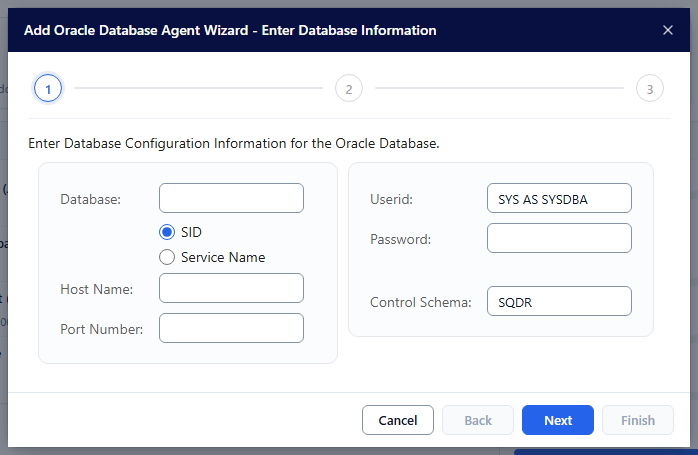
| Option | What it does | Default | When to change it |
|---|---|---|---|
| Database | For a CDB, the root container's SID or service name. | — | — |
| Port Number | Empty uses 1521. | — | When the listener uses another port. |
| Userid | An administrator who can create users and grant privileges, used to create the agent's user and schema. Keep the AS SYSDBA suffix for SYS. See Users and privileges. |
SYS AS SYSDBA | When you use another administrator, or a user created in advance. |
| Control Schema | The Oracle schema (user) for the agent's control tables, converted to upper case. For a CDB, the wizard adds C## (for example C##SQDR) unless the name starts with C## or SYS. |
SQDR | When another Stelo Capture system already uses SQDR in this database, or you add a second agent for it. |
Next connects as the administrator and checks the database: ARCHIVELOG mode, minimal supplemental logging, and,
for a CDB, that you connected to the root container; for a CDB, it also lists the PDBs for step 2. It doesn't change
the database: the wizard does that only at Finish (see What the wizard does on the database).
If the control schema holds an SQDR Plus v3 agent, the wizard offers to manage that agent remotely (see An existing agent in the control schema).
Step 2: Control Database and Agent Authentication
| Option | What it does | Default | When to change it |
|---|---|---|---|
| Control Database | The agent's staging database. An existing one puts this agent in it, in its own schema. See Step 2: Control DB. | <New Control DB> | To share a staging database with other agents. |
| Agent User | For a CDB, the common user of the control schema. | the control schema | For a non-CDB, when the agent should connect as another existing user. |
| Agent Password | If the user exists, its current password. | — | — |
To read the changes with XStream, see Use XStream with the agent.
Step 3: Logging
The defaults send no email. See Step 3: Logging.
Finish creates the agent Stopped. On Amazon RDS, run the grants in Amazon RDS for Oracle before you start it.
What the wizard does on the database
Next on step 1 stops with:
- "Database is using circular transaction logging. Please configure the database for archive logging and then retry
the operation." if the database isn't in
ARCHIVELOGmode (see Archive logging). - "Database is not configured for Supplemental Log Data. Please run "ALTER DATABASE ADD SUPPLEMENTAL LOG DATA" and then retry the operation." if minimal supplemental logging is off (see Supplemental logging).
- "name is a pluggable database. Please connect to the root/container database to configure SQDR." if you connected to a PDB.
For a CDB, it reads the list of PDBs (except PDB$SEED) for step 2.
Finish:
- Creates the control schema as a user if it doesn't exist (for a CDB, a common user in all containers), with the agent password if the agent user is the control schema, otherwise a generated password. An existing agent user is only checked; an agent user other than the control schema must already exist.
- Grants the control schema user a 100 MB quota on its default tablespace and the privileges to read the log and the data dictionary, in the root and in the chosen PDB (see Oracle users and privileges). A grant that fails doesn't stop the wizard.
- Registers the agent. For a CDB, the first time, it registers a parent agent for the root container and an agent for the chosen PDB, shown under it in the tree; another PDB of the same CDB later adds only its PDB agent (see Finish the wizard).
The wizard also sets requirePublication=true (tables must be published before you can subscribe to them) and
pollSleepTime=1 (the agent waits only 1 ms between reads of the log).
Publish the tables
Oracle agents require publishing (requirePublication=true): the Data Replicator Manager can add a table to an
incremental subscription only after it's published. For a CDB, publish on the PDB agent. The agent sets each table up
for capture when it runs; while it's stopped, the tables stay Initial.
- On the agent's Publications tab, click Add Publication and, when asked, enter a privileged user such as
SYSTEM(see Users and privileges). - Search for the tables, select them, keep Grant access to "agent user": selected, and click Finish. This
adds supplemental logging to each table (as the agent's
supplementalLoggingproperty sets) and grants the agent userSELECTon it. If you clear it, do both yourself.
For all options, including exporting the statements to a script for a DBA and importing a list of tables, see Publish tables.
Check that capture is running
- Select the agent in the tree and click Start/Restart (see Start the agent). For a CDB, the parent agent's Start/Restart also starts its PDB agents. The first start can take a few minutes.
- On the agent's Summary tab, the agent is Running, its Common worker shows no error, and the log position, an Oracle SCN, moves forward as the database changes.
- If not, the agent's Diagnostics tab shows why.
- On the agent's Publications tab, each published table moves to Published; Failed shows the error in Detail.
To check from the database, including XStream, see Check capture on the database.
Check capture on the database
-
XStream: the agent's Diagnostics tab has entries from
XStreamsReader. On the database, as the XStream administrator, the outbound server'sSTATUSisATTACHEDwhile the agent is connected (DETACHED: running, but no agent attached;DISABLEDorABORTED: not running):SELECT SERVER_NAME, CONNECT_USER, STATUS FROM DBA_XSTREAM_OUTBOUND;For more, see XStream diagnostics.
-
Log position: the agent's copy of its log position follows the database's current SCN, up to two minutes behind. Replace
SQDRwith the control schema (for a PDB agent,C##SQDR, and run the query in that PDB):SELECT NAME, SCN FROM SQDR.SQ_READERS; SELECT CURRENT_SCN FROM V$DATABASE; -
Published tables: each has a supplemental log group (
ALL COLUMN LOGGINGwith the defaultsupplementalLogging); replaceMYSCHEMAwith the tables' owner:SELECT OWNER, TABLE_NAME, LOG_GROUP_TYPE FROM DBA_LOG_GROUPS WHERE OWNER = 'MYSCHEMA';
After the first baseline
After you create the SQDR source, add tables to an incremental group and run its first baseline, check:
- The agent's Subscriptions tab lists them (with XStream, also the agent's
internal subscription to
SQ_BASELINES), and the source's Agent Summary tab in the Data Replicator Manager shows the agent's status.
Create the SQDR source
In the Data Replicator Manager, create a source for the same database, with the
DBMS Type Oracle:
- Connection: the SQDR bundled Oracle driver or the Oracle ODBC driver (Oracle Instant Client), with a connection string from the Oracle template (see Connection string). For a CDB, connect to the PDB's service, not to the root container.
- Login: SQDR's user (see Users and privileges), separate from the agent user, with at least
SELECTon the tables to replicate. - Incremental replication: when the Replicator Service finds the agent's control schema in the database, the source
allows incremental replication from it. Check that Capture Agent Schema is the agent's control schema, such as
SQDR(C##SQDRfor a CDB) (see Incremental Replication).
Then set up the destination, following its page under Destinations: it says when to create the incremental group with the published tables (for Databricks, once the Spark connector runs).
Connection string
SQDR bundled Oracle driver
HostName=myhostip;PortNumber=1521;ServiceName=myservice.mydomain.com, orSID=MYSIDinstead ofServiceName.- Multitenant (CDB): connect to the pluggable database (PDB) with its service name, not to the root container.
lsnrctl statuson the Oracle server lists the service names. - The Replicator Service sets the options it needs for this driver, including
ColumnSizeAsCharacter=1andColumnsAsChar=1, and for destinationsEnableBulkLoad(EBL=1) andEDP=1(describe parameters, which the Merge load needs) unless your string setsEDPorEnableDescribeParam; don't add them yourself. - Oracle Native Network Encryption (Advanced Security): set
EncryptionLevel,EncryptionTypes,DataIntegrityLevelandDataIntegrityTypesas your database requires. - SSL/TLS (required for Oracle Autonomous Database): convert the Oracle Wallet's keystore to PKCS12 (for example
with
keytool -importkeystore ... -deststoretype PKCS12), then addEM=1(Encryption Method: SSL),KeyStore=<path to keystore.p12>andKSP=<key store password>.VSC=0connects without validating the server certificate;VSC=1validates it and also needs the trust store (TrustStore). For example:HostName=adb.us-phoenix-1.oraclecloud.com;PortNumber=1522;ServiceName=myservice.adb.oraclecloud.com;KeyStore=C:\keystore\keystore.p12;KSP=$$ORA_KSP$$;VSC=0;EM=1. Keep the password in a secret.
Oracle ODBC driver (Oracle Instant Client)
DBQ=names the database: a TNS name fromtnsnames.ora(in the folderTNS_ADMINpoints to), or Easy Connect,DBQ=//myhost:1521/myservice. For a PDB, use the PDB's service name.- For SSL/TLS, configure the Oracle Wallet in
sqlnet.oraas Oracle documents (WALLET_LOCATION).
Settings
These properties on the agent's Configuration tab are specific to Oracle (see Properties by source database and Configuration properties):
| Property | What it does | Default |
|---|---|---|
requirePublication |
Tables must be published before they can be subscribed to. Set by the wizard. | true |
continuousMining |
Before Oracle 19c, without XStream: true uses LogMiner's continuous mining, false mines the archived log files. |
true |
avoidActiveLog |
Oracle 19c and later (or continuousMining false): reads only archived logs, never the online redo log (see avoidActiveLog). |
false |
oracleFetchSize |
How many rows the agent fetches at a time from LogMiner or XStream. | 1000 |
supplementalLogging |
The supplemental logging the agent adds for a published table: ALL, DYNAMIC or RELAXED (see supplementalLogging). |
ALL |
xstream, xstreamServer, xstreamUser, xstreamPassword |
The XStream settings from step 2. | — |
initialXStreamGrace, XStreamGrace |
XStream: how many minutes the log reader waits for records before it re-attaches or restarts. Raise them if the agent stays green but moves no data during large transactions (see initialXStreamGrace). | 30, 5 |
pluggableDatabase |
The PDB of a PDB agent. Set by the wizard. | — |
Data types
The Replicator Service maps Oracle types to the destination's types as described in Data type mapping. Specific to Oracle sources:
LONGandLONG RAWare treated as LOBs, and a subscription can have only one OracleLONGorLONG RAWdestination column (see LOB and long columns).- A table's
ROWIDcan be added as a destination column and used as the key (see RRN and ROWID columns).ROWIDis a reserved name in Oracle: for Oracle to Oracle, setrowidNameto another name first. JSONcolumns are replicated as their text (see JSON columns).- An Oracle
DATEalso holds a time of day. To replicate it to a Db2DATEcolumn, see Replicating Oracle DATE columns to Db2 DATE. - Virtual columns. LogMiner doesn't report changes to virtual columns. Leave them out of the subscription, and add a derived column that computes the same value instead, with SQL that both Oracle and Db2 for LUW accept (see Expressions for incremental subscriptions).
- Tables LogMiner can't capture. LogMiner ignores a whole table that has a column of a type or storage attribute it
doesn't support, so it can't be replicated incrementally (a snapshot still works). Oracle lists them under
"Unsupported Data Types and Table Storage Attributes" in its LogMiner documentation for your release, for example
BFILEcolumns, nested tables, objects with nested tables,PKREFandPKOIDcolumns, and, in some releases, identity columns and temporal validity columns. Before Oracle 12.2, column names longer than 30 characters are also unsupported. - Changes to LOB or XML columns only. LogMiner doesn't report an update that changes only
LOBor XML columns, so the change isn't replicated. Have the application (or a trigger) also update a non-LOB column in the same statement. - Tables with LOB columns need a key. The Replicator Service reads LOB values from the source table by the row's
key. Give such tables a primary key or unique index rather than keying them by
ROWID(see "ORA-01410: invalid ROWID").
Faster baselines with parallel query
Oracle parallel query can speed up the Replicator Service's baselines from an Oracle source, and its writes to an
Oracle destination. It doesn't help the Capture Agent's LogMiner or XStream connections. To turn it on only for SQDR's
user (SQDRUSER here), the DBA can create a logon trigger that sets the session's parallel options, for example:
CREATE OR REPLACE TRIGGER SYSTEM.LOGON_SQDR_TRIGGER
AFTER LOGON ON DATABASE
BEGIN
  IF SYS_CONTEXT('USERENV', 'SESSION_USER') = 'SQDRUSER' THEN
    EXECUTE IMMEDIATE 'ALTER SESSION SET PARALLEL_DEGREE_POLICY = LIMITED';
    EXECUTE IMMEDIATE 'ALTER SESSION SET PARALLEL_DEGREE_LIMIT = 2';
  END IF;
END LOGON_SQDR_TRIGGER;
/
Choose the degree with your DBA; see Parallel execution in Oracle's VLDB and Partitioning Guide for your release.
Limitations
- Publishing. A table must be published before it can be subscribed to (see Publish the tables).
- Archived logs. If an archived log is deleted before the agent (or the XStream capture process) has read it, the agent can't continue and the subscriptions need new baselines (see Archive log retention).
- Multitenant. The wizard and the agent connect to the root container, and each agent captures one PDB (see Supported configurations).
- Primary database only: not a read-only standby.
- XStream: one outbound server for each agent (see Outbound server), a separate Oracle license, and patches for some releases (see Required patches).
- Tables without a key are keyed by
ROWID, which Oracle changes when a row moves, for example afterALTER TABLE ... MOVE(see RRN and ROWID columns). - LOB values aren't staged: the Replicator Service reads them from the source table, and applies the changes of a table with LOB columns one row at a time (see LOB and long columns). An update of LOB or XML columns only isn't captured (see Data types).
- Data types LogMiner doesn't support, such as
BFILEand nested tables: such tables can't be replicated incrementally. Virtual columns aren't reported either (see Data types). - Schema changes. ALTER processing handles added, dropped and changed columns; other changes, such as to keys, need a new baseline.
- Amazon RDS for Oracle: no
SYSDBA; some grants need therdsadminprocedures (see Amazon RDS for Oracle).
Troubleshooting
Problems and messages, with their causes and fixes, are in Troubleshooting › Oracle.